Tag Archives: motorola moto g

Motorola Moto G – Review – 8 Part Review

Below are all the review posts I have written on the Motorola Moto G.

First Impressions – https://gavinsgadgets.com/2013/12/17/motorola-moto-g-first-impressions/

Part 1 – https://gavinsgadgets.com/2013/12/18/motorola-moto-g-review-part-1/

Part 2 – https://gavinsgadgets.com/2013/12/19/motorola-moto-g-review-part-2/

Part 3 – https://gavinsgadgets.com/2013/12/20/motorola-moto-g-review-part-3-accessories/

Part 4 – https://gavinsgadgets.com/2013/12/21/motorola-moto-g-review-part-4/

Misc sections-

Firmware update – https://gavinsgadgets.com/2013/12/20/motorola-moto-g-receiving-android-kit-kat-full-details/

Moto G vs iPhone 5S battery -https://gavinsgadgets.com/2013/12/24/why-i-hate-my-iphone-5s-but-love-my-moto-g/

Camera comparison – iPhone 5S vs Moto G – https://gavinsgadgets.com/2013/12/27/you-decide-which-camera-took-which-photo-iphone-5s-vs-moto-g/

Motorola Moto G in the UK receiving android KitKat OTA

The Moto G devices in the UK are now receiving the latest verison of KitKat.

The update includes the smart dialer, Hangouts SMS as the default SMS handler, and printing support. Once the update takes, the build will be KLB20.9-1.10-1.9.

If you haven’t received the notification for the update yet you can go to Settings>About phone>System updates. .

Motorola Moto G – review part 4 – Moto apps and battery

In this part of the Moto G review I am going to look at some of the apps Moto include. The Moto G is predominantly stock android but it does have a few tweaks.

First before I chat about the apps, the Moto G has managed 3 full days on one battery charge. Incredible.

The Moto G has a FM radio which does require your headphones to be plugged in.

20131219-131529.jpg

It scans and then allows you to select favourites. In the settings I found options for changing the radio frequency banding dependent on which part of the world you were located.

Moto Care in another included app.

20131219-131648.jpg

This just gives you the option of quickly getting support and help for your phone.

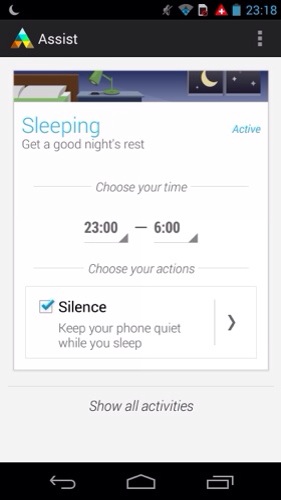
Next and most useful is Moto Assist.

20131219-131757.jpg

20131219-131808.jpg

20131219-131823.jpg

When in sleeping mode you can change the settings to allow for your favourites to still ring or if somebody tries several times to contact you. The app also starts producing suggestions and tips and how better to manage your phone as you use it. Eg setting brightness into auto mode. The suggestions aren’t mind blowing but for somebody who knows nothing about the phone and android the app is brilliant.

Moto also include their own photo editor but you are best using Google’s own one as it’s much better.

This week I have been left really impressed by the Moto G. It’s a very competent device that happens to be cheap. The camera is only average. It’s not the worst I have seen, and neither is it the best.

I will draw up my final thoughts after using it for another week or so.

But in the meantime please ask below in the comments if you have any questions.

Motorola Moto G – review part 3 – accessories

moto-g-color-shells-chalk-540

The Motorola G isn’t just a boring slab of black. It also can be customisable with Moto Shells. These come in 3 types. A replacement back cover shell (white version shown above), flip shell (shown below) to protect the front screen and grip shells.

moto-g-flip-shells-blue-semi-540x540

The grip shell is a replacement back cover, chunkier and more grippy. All of the shell types come in a variety of colours too.

You can also get power packs for the Moto G http://www.motorola.com/us/accessories-batteries-chargers/Power-Pack-Slim-series/universal-power-packs-slim-series.html in two different capacities.

If you recall on my first impressions, the Moto G does not come with any headphones. http://www.motorola.com/us/accessories-headphones-speakers/SOL-REPUBLIC-JAX-In-Ear-Headphones/sol-jax-in-ear-headphones.html However, you can buy Sol Republic Jax in-ear headphones that match all the colours of the official Moto G shells.

With the additional cost of the shells and headphones you can easily add another £40 to the overall cost.

Next time I will take a look at all the other non Google features included with this phone.

Motorola Moto G – receiving Android Kit Kat – full details

If you have the Moto G, Motorola is pushing the Android KitKat update.

Android 4.4, KitKat: Android 4.4.2, KitKat, is the latest release of the Android platform.

KitKat includes graphical enhancements e.g. new style status and navigation bars, a new full-screen mode, colour emoji support, improved closed captioning support, stronger security, smarter power use, and more tools and capabilities for better app development.

Phone dialer: Improved the phone app with the ability to look up contacts directly from the dial pad, see and tap frequent contacts, and search your corporate directory easily.

Camera – Focus and exposure: Enhanced the “touch to focus” option with a new circular, on screen control that can be dragged by your finger around the viewfinder to adjust a photo’s focus and exposure.

Gallery – Photo editing: Added new photo editing options to the Gallery app including new filter effects, draw on your photos, advanced cropping, and adjustments to color, exposure, contrast and more.

Printing documents and pictures: Added support for printing photos, Google Docs, GMail messages, and other content via Wi-Fi, Bluetooth and hosted services like Google Cloud Print and HP ePrinters.

Hangouts – SMS/MMS support: Incorporated a new version of Google Hangouts that supports integrated SMS/MMS messaging. Hangouts can be set as the default SMS app under Settings > Wireless > Default SMS app.

Accessory: support Added support for Square credit card reader.

The update is for both the U.S. and global versions of the Moto G. I haven’t received it yet for my Moto G. If you have a Moto G, have you received the update yet?

Motorola Moto G – first impressions

20131216-222702.jpg

The Motorola Moto G has arrived yesterday. Actually, I was asked to get some vegetables on my way home, and to my shock horror Tesco were selling the Moto G in both memory sizes, 8gb and 16gb, and both were in stock. So a few carrots and leeks ended up being a bit more expensive.

Tesco sell the Moto G for £99 but it is sim locked to their Tesco Mobile network. £2.04 on eBay and ten minutes later and the sim lock was removed. Then 5 minutes to reflash the firmware with the Moto G default firmware and now I had an unlocked and de-Tesco’d phone. All for £101.04.

The system firmware needs 3gb. So with the 8gb I only had 5gb left. That was enough for about 30 apps, most of which were games. The phone feels comfortable in the hand and isn’t too big. The volume rocker rattles as does the power button. It’s fine just not premium engineering. Everything else about the phone seems ok. In fact the overall build quality is quite reasonable.

If you have this phone especially with the 8gb version you will have to stream everything and use the cloud services that Google and or others provide.

The screen is great. Battery life is unknown at present. Most of my apps installed ok. So surely there must be a catch. Well 5gb user available memory isn’t much. But you can manage. Sound via the headphones is astonishing. I was expecting it to be crap or poor but it wasn’t. It was well above average. This is achieved using the Equaliser settings. I will report back on the loudspeaker once I have had more time with it.

The Moto G includes an FM Radio, Moto Assist, Moto Care and tips, and all the Google services.

So would I sell my iPhone 5S for the Moto G ? Find out over the course of this week?