Samsung’s SmartStay goes hi tech

Not to be outdone by Apple’s Touch ID, Samsung is using it eye and face detection experience and taking it to the next step.

This would mean it would scan your eye balls to unlock your phone.

Hmmm not so sure what I think about that one. What’s your view on the idea?

Samsung looking to prevent customers using third party accessories

Sammobile reported that Samsung is looking to restrict its customers using third party batteries and cables with its phones by incorporating a ID chip.

This means third party companies will have to obtain authorisation and the necessary equipment from Samsung in order to be able to sell accessories.

This might seem draconian but it is similar to what Apple does with it’s lightning connector.

New iPads announced by Apple – but what was missing ?

Apple announced a new iPad Air and iPad Mini Retina. But prior to the announcement there were many rumours of the features one might expect from these new iPads. So what didn’t make the cut?

The obvious omission was TouchID as featured on the iPhone 5S. To be honest a fingerprint scanner on the home button may not have been as natural to use as it is on a phone. But nonetheless it was missing.

Colours. Unlike the iPhone 5C which is available in many colours there were no new finishes. In fact what happened to a gold iPad. I wonder how people who bought a gold iPhone feel now, hoping they would get a gold iPad too? Have you been affected by this?

I do have a gold 5S and therefore won’t be able to have a matching finish of the new iPads.

Cameras. The new iPhones have 8mp cameras. The new iPads only have 5mp.

These are the most obvious omissions. Do you feel anything else should have been included?

I do think with all the software Apple is providing with iOS 7 and new devices the combined hardware and software experience will be unrivalled.

Whats new with iOS 7.0.3 update

Last night was a big day for Apple. This included releasing iOS 7.0.3. The update included –

-iCloud Keychain
-A new Password Generator has also been added to the Safari browser
-updates the 5S lock screen to delay the display of “slide to unlock” when Touch ID is in use.
-Addresses an issue where iMessages would fail to send for some users
-Fixes a bug that could prevent iMessage from activating.
-Improves system stability when using iWork apps
-Fixes an accelerometer calibration issue
-Addresses an issue that could cause Siri and VoiceOver to use a lower quality voice
-Fixes a bug that could allow someone to bypass the Lock screen passcode
-Enhances the Reduce Motion setting to minimize both motion and animation
-Fixes an issue that could cause VoiceOver input to be too sensitive
-Updates the Bold Text setting to also change dial pad text
-Fixes an issue that could cause supervised devices to become un-supervized when updating software

Some decent extras and bug fixes.

The Apple Keynote and the long list of new products and software – my views

Yesterday Apple announced changes to its own Apps, iLife and iWork, launched OS X Mavericks for Macs with support on some really old devices dating back to 2007, launched 2 new iPads and new smart cover and cases, the iPad Air and iPad Mini Retina, updated its MacBook Pro line and introduced the new Mac Pro.

If you want to read all about the new hardware and software in crazy detail, go to http://www.Apple.com .

So what’s my view on all this Apple news. Simply, it is one of unity and trying to deliver a complete eco system across media, productivity and all hardware regardless as to whether you are using a Mac, iPhone or iPad.

Apple does not want you to use other services, or other cloud services os by offering free software and software updates it accelerates this unity towards an even stronger one eco system reliance. And from what I have seen it is going to do this really smoothly and slickly.

And then the was the new full size iPad, renamed as the iPad Air, and at its thickness of 7.5mm and weighing 469g it is seriously thin and light. I previously owned the Sony Z Tablet which weighed 495g and that was amazing, but the iPad Air is a much smaller profile too and has smart covers, something the Z Tablet could have done with.

Most people might sway towards the iPad Mini Retina as it is a smaller more portable affair. It also has the identical spec compared to the iPad Air, just a smaller screen and naturally weighs less at 331g. The retina Mini is a fraction thicker than the old Mini but it is hardly noticeable. But don’t lose sight of having a larger screen on a lightweight frame will really be a wow moment.

But, here is an interesting fact. The iPad Air has a 264 ppi screen resolution vs the iPad Mini Retina which comes out at 326 ppi. So the Mini screen will look better as it is smaller. As a comparison the Sony Z Tablet 10.1 inch is 224 ppi and the Google Nexus 7 2013 is 323 ppi so practically identical to the iPad Mini Retina.

Also surprising is the fact that both iPads are now available in 128gb memory capacities.

And the one fact with Apple that no other company has learnt to do, is make an announcement on a new product/updates and then immediately or within a week or two, you are able to buy the new product. Apple has made the iPad Air available on 1st November and all the new MacBook’s from today. That is fantastic.

But really, my question is which iPad would you buy and why?

Netatmo Urban Weather Station for iOS, android and Windows Phone

I have written 2 previous articles on this weather station. Click here to recap https://gavinsgadgets.wordpress.com/?s=netatmo&submit=Search

After owning the Netatmo Urban Weather Station for over a week now, I am writing my full review. Before I start I will just say this is one of those products that does exactly what it says on the tin. If you look back at the previous two articles you will see screen shots of the functionality from the iOS app, web app, WeatherPro and baratmo mac app. Below is the indoor sensor.

IMG_1110

Rear of indoor sensor. Outdoor sensor looks identical, except one inch shorter.
IMG_1111

It comes in a box with two sensors, the indoor sensor is taller than the outdoor one by about an inch. You also get a micro usb cable, UK plug, startup guide/installation of sensors, a screw and raw plug, strap for indoor sensor and that is it. Oh, there was also 4 AAA batteries. I downloaded the app, created a user ID and password, after which then took me into the setup. So all you do, is install the 4 batteries into the base of the outdoor sensor, drill a hole in to an outside wall, where the sensor wont be exposed to direct sunlight and rain, screw the screw into the raw plug and then slide outdoor sensor onto the screw. 5 mins after completing that task, I then connected the indoor sensor to the mains. I then continued to follow the iOS app instructions for setup. At each turn you get a pretty picture of what to do and written instructions. Really, really simple and clear instructions. You next connect your phone directly to the indoor sensor and it updates the sensors firmware, reads your wifi setup and copies it across. The indoor sensor then talks to the outdoor sensor and voila. The screenshots below give you a clear idea of what data you can obtain but this includes indoor and outdoor temperatures, CO2 indoor, humidity, air quality (via CiteAir), mbar, sound levels, weather forecasts (provided by MeteoGroup), graphs plotting data over a given period and more. As an example the rain mode gives you: the amount of rain per 3 hour period (represented by blue bars) and the probability of rain (represented as a red curve). By touching on the icon button on the air quality gauge, you may switch between background air pollution index,
traffic air pollution index and complementary information about the main pollutant.

Screenshot from iOS app which will look the same for android. The Windows Phone app takes on the tile look of Windows Phone.
IMG_1090

This displays details of the indoor and outdoor sensors. Buy scrolling down or flicking up you can reveal more data.
IMG_1091

You can also go in to the settings and retrieve information on the sensors and their battery and wifi strengths. Turning the phone horizontal will allow you to show graphs on all the different measurements. Pinch and zooming allows for the data to be expanded or shortened depending on your requirements. The web app is excellent and shows nearly everything across one page.
20131014-195628.jpg
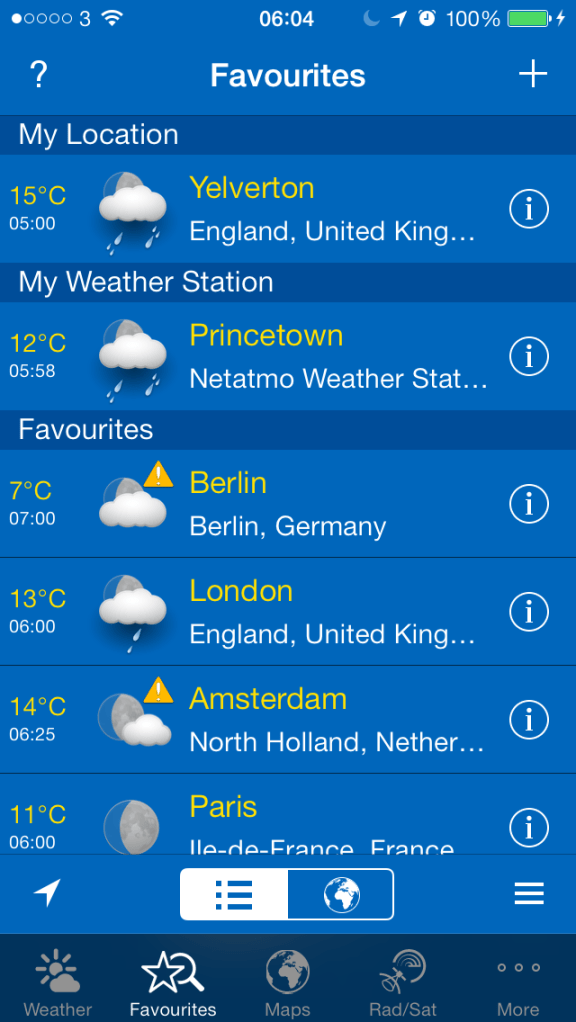
It is great that you can integrate the Netatmo Urban Weather station into other apps. So far I have found WeatherPro on iOS and Baratmo for mac. Screenshots below.
IMG_1092
IMG_1093
and for the mac, Baratmo provides a quick list of data from the status bar.
bar

The key aspect of this solution is that it all has to be linked to your home network via wifi and logged in to Netatmo servers. You need 4 AAA batteries in the outdoor sensor which requires installation on a wall, preferably not in direct sunlight and directly exposed to rain. i.e.. perhaps under the eaves. And apparently the batteries last one month, but at present I cannot provide confirmation of that as I have not had the product long enough. A caution, if Netatmo’s servers go down, you will not get any data.I have had this a week, and for 2 hours last Wednesday they were updating their servers so I received no data.

The sensors send data every 5 mins, can provide notifications for high levels of CO2 or weather warnings from sensors, you can manually check for a CO2 reading immediately update by pushing the top of the indoor sensor. When measuring on demand, the indoor module displays the CO2 level using the following color code:
– Green = Good
– Yellow = Could be improved
– Red = Room should be ventilated.

You can also invite friends into the Urban Weather Station to share you data too. You can also act as a contributor for your outdoor readings. This is still a work in progress, but this is a map of what people would see.
map

All in all it is an impressive experience, albeit expensive at £139. Additional indoor sensors, up to another 3 can be added to the system too. There is also a PDF manual that you can download which is seriously comprehensive.

So far I have really enjoyed using the Urban Weather Station, and is probably my favourite gadget of the year.

Update – after a week, the following notifications appeared.

20131019-171413.jpg

Update 2 – last night mapatmo tweeted me and invited me to be part of the Public World Netatmo World Map. More details here – http://www.mapatmo.com

2 New Nokia Window Phones and a Tablet announced – Lumia 1520, 1320 and 2520 full details

Nokia announced three new devices at Nokia World, including two phones—the Lumia 1520 and1320, and the new 10-inch Lumia 2520 tablet.

Nokia Lumia 1520 – a 6 inch full HD 1080p screen. The new Windows Phone update, supports the larger, HD display along with a jumbo-sized start screen with room for three large or six small Live Tiles across. The phone comes with a 20MP PureView camera that leverages many of the innovations found in the Lumia 1020 —including optical image stabilization, oversampling technology to capture more details, and great zooming ability. Four built-in microphones, meanwhile, provide directional stereo recording capability and clear, distortion-free sound for your HD videos. The Lumia 1520 also comes with an impressive is roster of photo apps—including the new Nokia Camera and Nokia Storyteller. More details can be found on these in today’s software piece.
Under the hood, the Lumia 1520 is powered by a Qualcomm Snapdragon 800 quad-core processor. The Nokia Lumia 1520 will come in yellow, white, black, and glossy red (exact color selection will likely depend on your carrier), and is expected to roll out later this year in the U.S., U.K., China, France, Singapore, Germany, Finland, Singapore, Hong Kong, and other markets. The rest of the 1520’s spec sheet include Qi wireless charging, a 3,400mAh battery, 32GB of internal storage, microSD expansion up to 64GB, 2GB of RAM,1.2MP front-facing cam and even a dual LED flash to go along with the rear camera. Estimated price: $749 USD before taxes and subsidies. The 1520 uses a nano sim and has cat4 LTE. It also is far too big for me as a mobile phone.

Nokia Lumia 1320 – Nokia also unveiled the Lumia 1320, a lower-cost sibling that features a 6-inch 720p screen and 8GB of internal storage (expandable to 64GB).

Like its sibling, the Lumia 1320 comes packed with Nokia’s impressive portfolio of photography, entertainment, and navigation apps, including HERE Maps, HERE Drive and HERE Transit, Nokia Music, and more. Available in orange, yellow, white, and black, the phone and is expected to roll out in the first quarter of 2014 to China and Vietnam, followed by other Asian markets, India and Europe. Estimated price tag: $339 USD before taxes and subsidies.

The Nokia Lumia 2520 is a 10.1-inch full HD display with 650 nit brightness. This display looks good and offers great viewing angles. Nokia’s selling point on this panel, however, is its five percent reflectance which means the 2520 should be clearly visible both indoors and out. There’s a 2MP front-facing cam for video chatting, as well as a 6.7MP f/1.9 camera on the back (this is the same module as the Lumia 720). You’ll also get LTE connectivity, a micro-USB 3.0 connector for data transfers and an 8,000mAh battery with Qualcomm QuickCharge tech. Sadly it runs Windows RT 8.1. It does however come with all the Nokia camera apps and software.

What do you think of all the new Nokia hardware?

.

Nokia World has just finished and software was big news – info on new apps

So Nokia just held Nokia World in Dubai. They announced new phones and a tablet but they also went big on announcing new software apps and games. As we all know it is the user experience that counts and software makes a big difference.

Below are some of the new apps and games coming to Windows Phone /Nokia Lumia handsets.

– Flipboard – complete with Live Tiles

– CamScanner – Scan, sync, edit, share and manage your documents.

– ESPN F1 – The official ESPN F1 app for Windows Phone brings you the best Formula One coverage across the globe, delivered in English, French and Spanish. The app provide news, features, live race commentary, and detailed information about teams, drivers, and circuits.

– Instagram – say no more. Big news for the platform. The official app arrives in two weeks.

– InNote – finger writing app for taking notes, writing memos and making annotations.

– Nokia Camera – finally Nokia merges two of its most powerful and popular stand-alone photo apps—Pro Camera and Smart Camera

– Nokia Storyteller – Relive your memories in a dynamic and interactive way. Storyteller integrates your pictures with HERE location information, then plots the chronological picture journey on a map. Video, animated Cinemagraphs, and burst shots make your experiences come to life.

– Papyrus – A natural handwriting note-taking app that you use just like paper, Papyrus lets you take notes with a stylus or your finger. Select, move, resize, cut, copy and paste your handwriting, and even edit the color and thickness of your writing.

– phriz.be – Share high-res photos with friends and family between a variety of devices.

– PicFeed – Create and share multiple custom Instagram photo feeds with Windows Phone 8. Instagram account holders can Like and Comment on Instagram photos directly from PicFeed.

– Plex (Plex Systems) – This personal media app can manage all of your videos, music, and photos across multiple devices. Share videos between Windows Phone 8, iOS, and Android devices, and more. Shoot video on your Nokia Lumia phone and replay it not just on your computer, but on any smart TV or TV with Windows media center. The new Windows Phone 8 app will is exclusive to Nokia users and free for a limited time.

– SophieLensHD – SophieLensHD, has been redesigned for larger displays like the 6” display on the Lumia 1520 or 1320.

– Xbox Video – Xbox Video is coming to Windows Phone this holiday, giving people easy access to a massive library of the latest blockbuster movies and TV shows. The Xbox Video app for Windows Phone lets you buy or rent your favorite movies and shows, and watch them across any supported devices. Exclusive to the platform.

– Vine – The rising star of the video sharing app world, Vine makes it easy for Lumia users to capture and share their world in short looping videos.

– Vyclone Pro – The new and improved Vyclone Pro video collaboration app is designed to take advantage of the 1080p screen on the Lumia 1520, sporting an updated user interface that lets you record and upload videos from anywhere, plus select from three exclusive video filters.

– Asphalt 8: Airborne – The best arcade racing game series reaches a new turning point. The game is optimized to run on the full HD displays of the new Lumia 1520.

– Danger Dash – Are you a real adventurer? Prove it in this endless runner that challenges you to dodge tigers and collect coins as Chuck Ace, adventure lass Miranda Rose, or the brawny Blowing Wind.

– FIFA 14 from EA Sports – FIFA 14 is optimized for the full HD displays of the new Nokia Lumia 1520.

– My Talking Tom – Adopt your very own baby Tom. Feed him, play with him and nurture him from a cute kitten to a fully-grown Tom cat.

– Rabbids Big Bang – Ubisoft’s famous Rabbids have blasted off into space.

– Rail Rush – This epic game, from the makers of iStunt2 and Gravity Guy, is exclusive to Nokia Windows Phones for three months.

– Rayman Fiesta Run – Ubisoft is bringing a new platformer set in the Rayman fan-favorite, Gourmand Land, to Nokia.

– Temple Run 2 – The sequel to the smash hit endless runner that took the world by storm. Now coming to Windows Phone.

Some truly good software titles soon to arrive on Windows Phone start to make the platform even more appealing.