Nokia Black update is live – details

The Lumia Black software update is rolling out for Nokia Lumia WP8 owners around the world from today.

The update brings new features, improvements in imaging, new apps and app updates from Microsoft and Nokia to make the Lumia smartphone experience even better.

The main features brought along with the update from Nokia include:

App Folder. This brand new feature makes your Lumia experience even more fluid by giving you an option to further personalize and organize your Start screen. With App folders you can group similar apps and settings into one folder, a tile, on your Start screen.

Nokia Glance screen 2.0. Helps you keep track of information in real time, making all your most important notifications including: phone, messages, email, outlook, calendar, or any apps that use notifications such as Twitter, Facebook, Whatsapp, or games;  always visible at a glance on your screen. It saves time and energy.

Bluetooth LE. Will now be enabled across the full Windows Phone 8 Lumia range for compatible gadgets like the Adidas MiCoach accessories. 

Nokia Refocus. The amazing Nokia Refocus comes to all Windows Phone 8 Lumia smartphones with 1GB of RAM and upwards.

Nokia Beamer. Sharing what’s on your phone is easier than ever with Nokia Beamer. You can now beam documents, presentations, anything you like, to any HTML5-enabled screen by simply scanning a QR code on the screen. It’s coming to all of the phones with 1GB RAM upwards.

Nokia Storyteller. The app arranges your photos for you, by date and by place, making it easier to tell the stories behind your pictures, and give extra context through the close integration of interactive maps.

Nokia Camera. Combines Nokia Pro Camera and Smart Camera to simplify the photo-taking experience, and ensure you get the perfect shot every time. The app has been available for Lumia PureView smartphones since last year, but it’s now coming to the rest of the WP8 Lumia range. The latest Nokia Camera update also bringsraw DNG support for Lumia 1020 owners.

Latest generation of imaging algorithms. The Lumia Black update further improves the image quality, especially in Lumia 1020. Among others, the improvements include a new oversampling algorithm, making your images more natural looking with reduced noise, while ensuring your photos remain wonderfully sharp.

 
The Lumia Black update also brings a series of enhancements from Microsoft to Nokia Lumia smartphones. These include safe driving mode – which cuts out unnecessary distractions when you’re on the road; customised ringtones for each contact. You can now also close apps within the in multitasking view and lock the screen rotation if you wish.

Timings: The Lumia Black update has begun rolling out today for Lumia 1020 and Lumia 925 smartphones, with other models in the rangefollowing in the coming weeks.

 How to update: Nokia Lumia smartphones automatically check for updates every week, and will notify people when it finds one. Otherwise check by going to Settings -> Phone update – it downloads and installs straight from that screen.


Nokia Lumia 1520 – review – final thoughts

I’ve used the 1520 for just over a week now and it delivered one of the best window phones experience’s.

A superb camera in a huge 6 inch screened piece of stunning hardware.

The size is not for everyone. I did find the height of the 1520 too tall for my work shirts front pocket. Whilst the Note 3 sticks out a cm the 1520 protrudes by 3 cm making me think that if I bent over slightly it could fall out.

In some of my jackets I could sense the large bulk of the phone as well. But apart from that if was a pleasure to use.
Recommended if large phones is your preference.

Thanks to Clove Technology for sending the Lumia 1520.

Samsung Note 3 – 3 months later – one handed use

One feature I like with the Note 3 is one handed use. Ideal when out and about and works really well.

First the keyboard can be shrunk for left or right handed use.
image

Then the phone dialer can be made smaller..
image

And if you really want extreme one handed use you can shrink the whole page. You can move the screen around and it comes complete with all the menu options.

image

Rather neat touches. The keyboard is especially handy when out and about in one handed mode.

Intel goes for wearable tech at CES 2014

image

Intel took the wraps off an always-on smart headset,  Jarvis, which integrates with existing personal assistant technologies. It works like Apple’s Siri — but you simply plug in the headset and speak to it, without having to pick up or even touch your phone. it is a “seamless, no buttons, always listening.”

image

Intel also announced smart earbuds — which has biometric and fitness capabilities. Sensors that measure your heartrate are built into the earbuds, which get their power from the microphone jack in your smartphone, so all you need on your run is your mobile device with the app loaded onto it, and a pair of smart earbuds.

Samsung Galaxy Note Official S-View Premium Cover – impressions

I received the official Samsung S-View Premium case at the weekend. This is the case that allows you to see and control a limited amount of actions on the Note 3 via the square clear window in the flip cover. It is very expensive at £34 approximately.

The case provides options on the colour of the window background. You have the option to see the time and missed notifications, walking steps, weather and sliding across the camera, music and action notes, without actually opening the flip cover. And that is it.

What you lose is the quick glance screen and the Watch On remote widget on the lock screen, which I have found more useful. Also the rear of this case replaces the current back cover. A good idea except its thicker than what it replaces. You can use the stylus on the cover window which is something. The camera function is weird. It takes a picture just fine but it is only a small square, similar size to the case window and not a full width shot. Another odd decision by Samsung IMO.

Some people will like this case, but for me it didn’t add any real advantages with the quick access information and in fact took away some functionality for me.

Nokia Lumia 1520 – review part 3 – camera

If you have read my earlier reviews on the Lumia 925 and Lumia 1020 you will be familiar with all the camera options. In essence, the 1520 is a 20mp Carl Zeiss lens with optical image stabilisation and 2 x lossless zoom. It has many pro camera settings for some great artistic tricks. But most people are just going to hit the shutter button or on screen button. Yes, unlike other phones, the Lumia range do have a dedicated camera hardware button on the edge.

So I really wanted to test the optical image stabilisation and quality of the end results. So let’s set the scene. At 3am thunderstorms and gales arrived. At midday, it was just high winds with a piercing cold wind too. My eyes were watering from the cold, and I could hardly stand still as the wind kept moving me all over the place. As a comparison I took with me the Samsung Galaxy Note 3, but due to the wind all of the photos ended up being blurred.

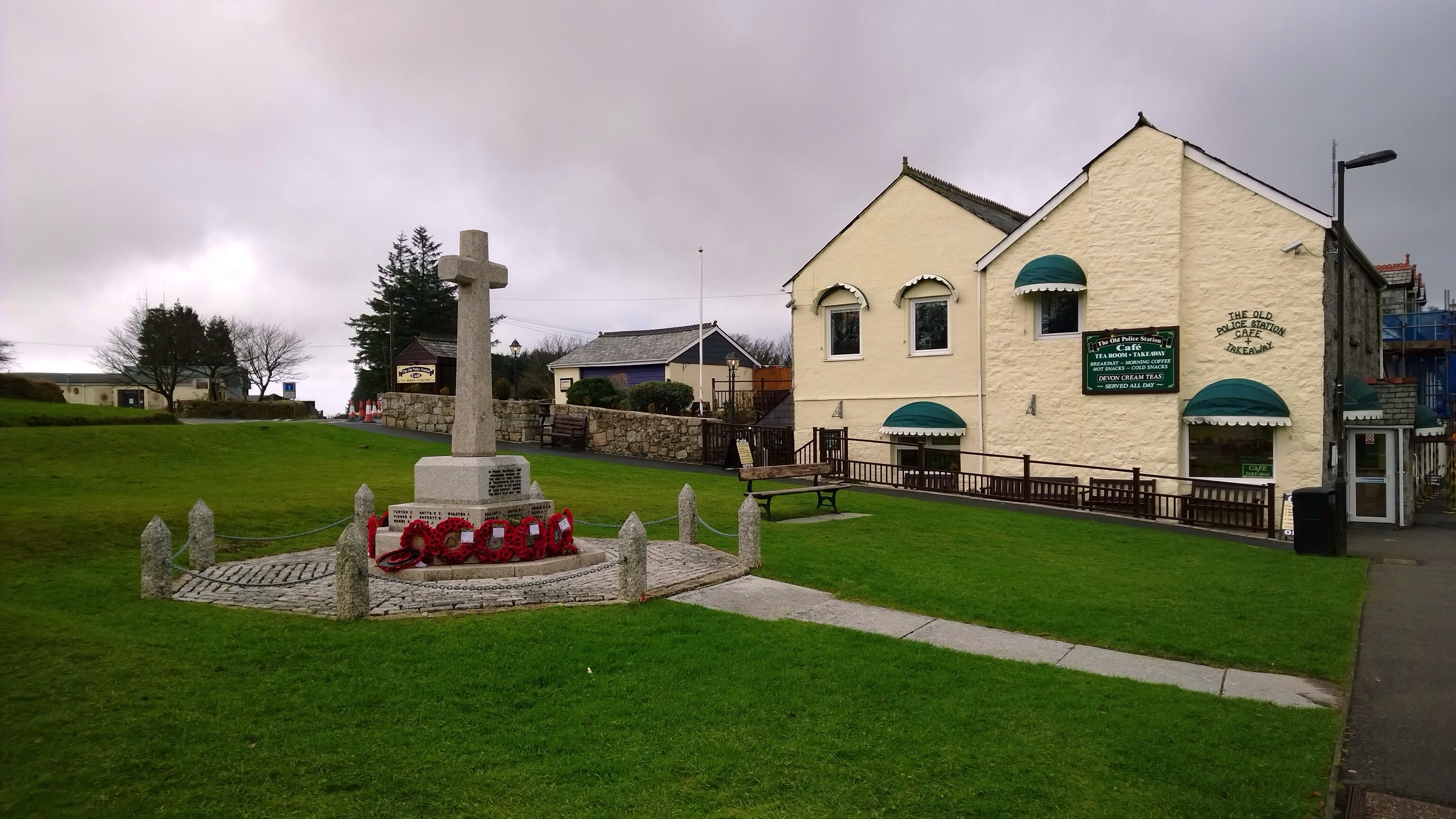
First up the war memorial in Princetown, Dartmoor, Devon. The accuracy of the colours is phenomenal.

20140107-124105.jpg

Next is the Dartmoor Visitor Centre. Most phones would struggle to capture the whole building and lamppost.

20140107-124303.jpg

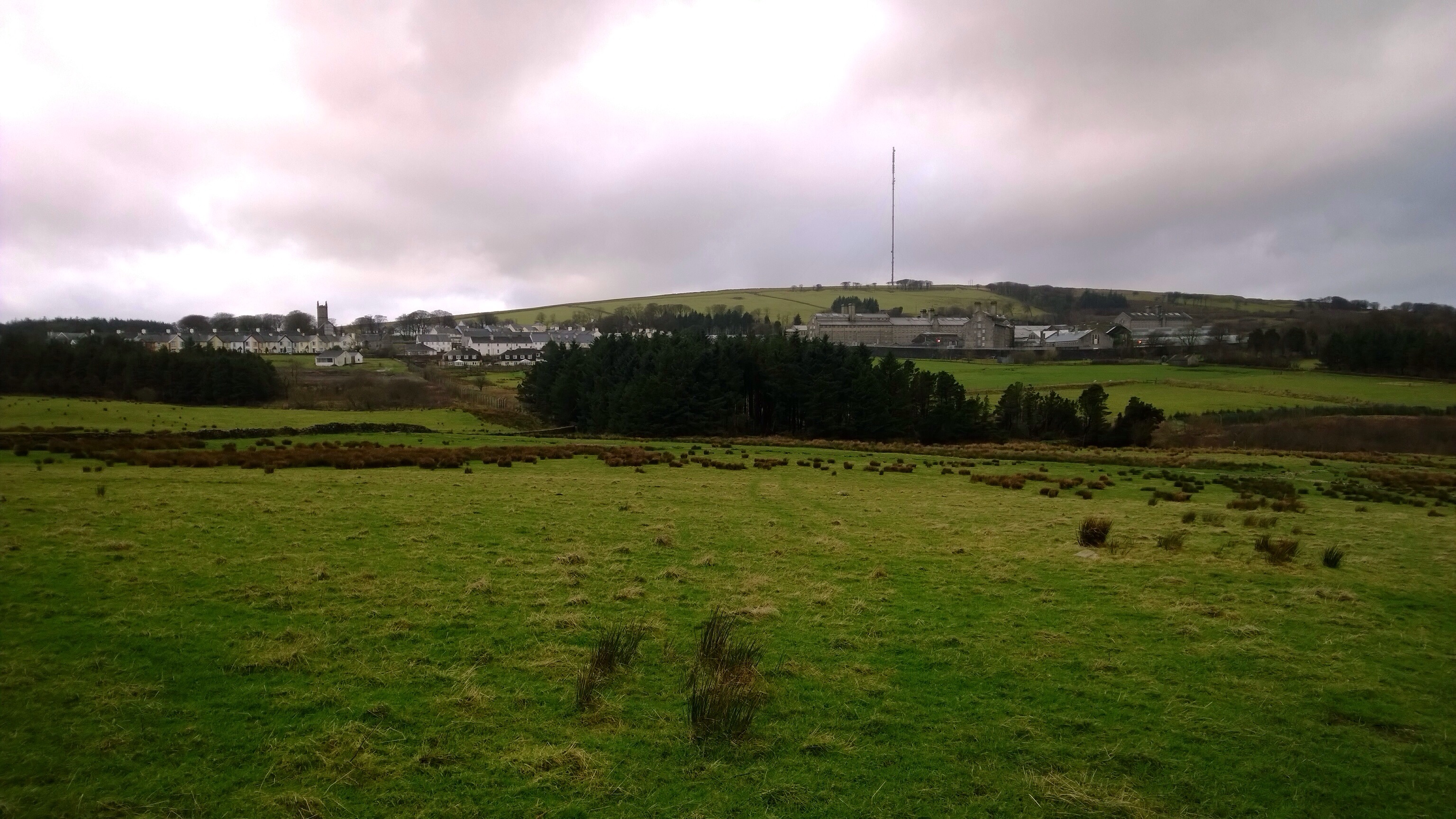
Next up is the view over to Dartmoor Prison, a famous Victorian prison. What’s great about this shot is once again the amount captured in the frame, but also the clarity of the church in the distance.

20140107-124455.jpg

And finally, I took this exposed to the wind with the 1520 actually shaking as I couldn’t hold it still enough. The optical image stabilisation worked a treat.

20140107-124647.jpg

Bear in mind the above are only the 5mp versions of the shot. The 1520 actually saves a hi resolution pureview shot at 20mp as well. With this you can use this to undertake some pro editing. Or using the Nokia Pro Cam camera app, reframe the shot you just took to create a different view. You can the save this and go back again into the original hi-res shot and repeat as often as you like.

Having used both the 1020 and now the 1520, I would personally choose the 1520. It has a faster processor and this is evident in shot to shot times being near instant.

If you would like one of these phones or something else head over to Clove Technology who will be happy to help you.

Sony Xperia Z2 may make MWC 2014 appearance

Sony Xperia Z2 may make MWC 2014 appearance according to @evleaks.

The phone is currently known as the Sony Sirius and has a 5.2-inch display with a Qualcomm Snapdragon MSM8974AB SoC chipset.

Earlier rumours suggested that it would have a 1080p full HD display with 506ppi, a quad-core Snapdragon 800 processor, 3GB of RAM, Android 4.4 and a 20.7MP camera with a xenon flash.

No word on whether optical image stabilisation is on board. This would be a killer feature.

CES 2014: Asus Padfone mini is a 4-inch phone and 7-inch tablet in one

The Padfone mini is a 0.44-inch thin, Android 4.3 Jelly Bean (with KitKat on the way) handset with a 4-inch, 800 x 480 IPS+ LED touch screen. You can then place the phone into the back of a tablet station rocking a 1280 x 800 IPS+ LED touch panel. A 1.6GHz Intel Atom Z2650 chip powers the 4.09-ounce Padfone mini – and by extension its tablet dock – with some help from 1GB of RAM. As for storage, the phone is only 8GB onboard and expandable by up to 64GB via microSD card.Powering all this, plus the phone’s 8MP (with f/2.0 aperture and backside illumination) and 2MP shooters, is an 1170mAh battery. The tablet dock gets its very own juice to the tune of 2100mAh – both are non-removable polymer batteries.

The Padfone mini supports dual SIMs and comes with Asus own custom skin, ZenUI.

image

Amazon’s Bezos rescued by Ecuador Navy – details

Reuters reported that Amazon.com founder Jeff Bezos was airlifted from a cruise ship by the Ecuadorian Navy after suffering a kidney stone attack on January 1, according to the website Galapagos Digital.

The website, citing Ecuadorian newspapers and blogs such as El Universo and El Comercio, said Bezos was flown by helicopter to his private jet on Baltra Island.

This was kept very quiet, lets hope all is ok with Mr Bezos.

iOS 7.1 beta 3 released with new graphical tweaks

Apart from the usual bug fixes, this beta also changes the appearance slightly of some of the screens.

20140107-231316.jpg

First up is the keyboard shown on the right. It’s slightly darker and looks sharper in places.

20140107-231359.jpg

The icons top right are newer and again slightly darker toned.

20140107-231432.jpg

The power off screen has changed too as shown above.

20140107-231506.jpg

The dialler above on the right looks much better with all rounded buttons but do you agree?

And finally the music shuffle text is much clearer. This was the one area that I felt definitely needed improving.

So have you installed the new beta, and what do you think of the new screens?

20140107-231823.jpg