Category Archives: Windows

Netatmo Urban Weather Station for iOS, android and Windows Phone

I have written 2 previous articles on this weather station. Click here to recap https://gavinsgadgets.wordpress.com/?s=netatmo&submit=Search

After owning the Netatmo Urban Weather Station for over a week now, I am writing my full review. Before I start I will just say this is one of those products that does exactly what it says on the tin. If you look back at the previous two articles you will see screen shots of the functionality from the iOS app, web app, WeatherPro and baratmo mac app. Below is the indoor sensor.

IMG_1110

Rear of indoor sensor. Outdoor sensor looks identical, except one inch shorter.
IMG_1111

It comes in a box with two sensors, the indoor sensor is taller than the outdoor one by about an inch. You also get a micro usb cable, UK plug, startup guide/installation of sensors, a screw and raw plug, strap for indoor sensor and that is it. Oh, there was also 4 AAA batteries. I downloaded the app, created a user ID and password, after which then took me into the setup. So all you do, is install the 4 batteries into the base of the outdoor sensor, drill a hole in to an outside wall, where the sensor wont be exposed to direct sunlight and rain, screw the screw into the raw plug and then slide outdoor sensor onto the screw. 5 mins after completing that task, I then connected the indoor sensor to the mains. I then continued to follow the iOS app instructions for setup. At each turn you get a pretty picture of what to do and written instructions. Really, really simple and clear instructions. You next connect your phone directly to the indoor sensor and it updates the sensors firmware, reads your wifi setup and copies it across. The indoor sensor then talks to the outdoor sensor and voila. The screenshots below give you a clear idea of what data you can obtain but this includes indoor and outdoor temperatures, CO2 indoor, humidity, air quality (via CiteAir), mbar, sound levels, weather forecasts (provided by MeteoGroup), graphs plotting data over a given period and more. As an example the rain mode gives you: the amount of rain per 3 hour period (represented by blue bars) and the probability of rain (represented as a red curve). By touching on the icon button on the air quality gauge, you may switch between background air pollution index,
traffic air pollution index and complementary information about the main pollutant.

Screenshot from iOS app which will look the same for android. The Windows Phone app takes on the tile look of Windows Phone.
IMG_1090

This displays details of the indoor and outdoor sensors. Buy scrolling down or flicking up you can reveal more data.
IMG_1091

You can also go in to the settings and retrieve information on the sensors and their battery and wifi strengths. Turning the phone horizontal will allow you to show graphs on all the different measurements. Pinch and zooming allows for the data to be expanded or shortened depending on your requirements. The web app is excellent and shows nearly everything across one page.
20131014-195628.jpg
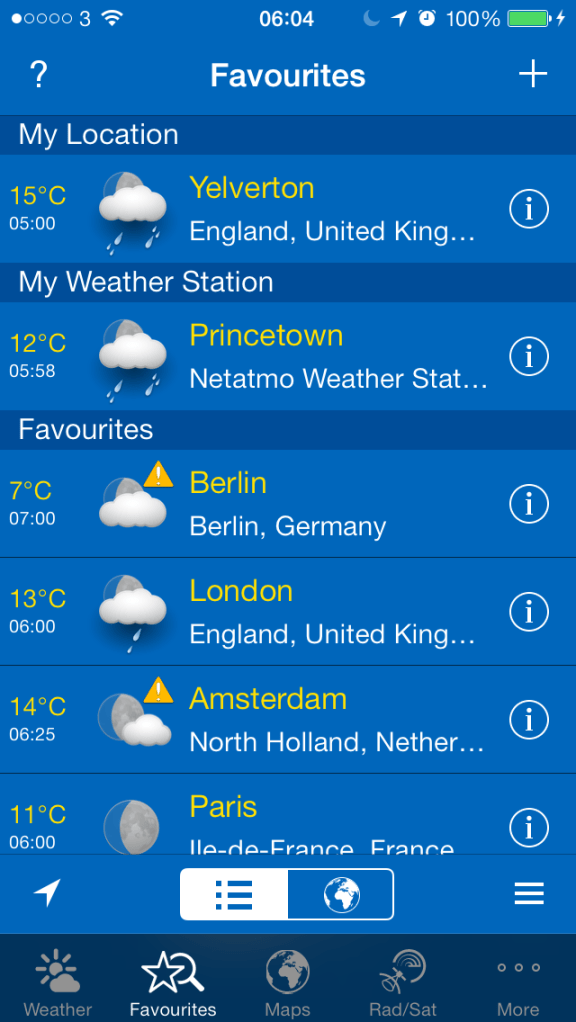
It is great that you can integrate the Netatmo Urban Weather station into other apps. So far I have found WeatherPro on iOS and Baratmo for mac. Screenshots below.
IMG_1092
IMG_1093
and for the mac, Baratmo provides a quick list of data from the status bar.
bar

The key aspect of this solution is that it all has to be linked to your home network via wifi and logged in to Netatmo servers. You need 4 AAA batteries in the outdoor sensor which requires installation on a wall, preferably not in direct sunlight and directly exposed to rain. i.e.. perhaps under the eaves. And apparently the batteries last one month, but at present I cannot provide confirmation of that as I have not had the product long enough. A caution, if Netatmo’s servers go down, you will not get any data.I have had this a week, and for 2 hours last Wednesday they were updating their servers so I received no data.

The sensors send data every 5 mins, can provide notifications for high levels of CO2 or weather warnings from sensors, you can manually check for a CO2 reading immediately update by pushing the top of the indoor sensor. When measuring on demand, the indoor module displays the CO2 level using the following color code:
– Green = Good
– Yellow = Could be improved
– Red = Room should be ventilated.

You can also invite friends into the Urban Weather Station to share you data too. You can also act as a contributor for your outdoor readings. This is still a work in progress, but this is a map of what people would see.
map

All in all it is an impressive experience, albeit expensive at £139. Additional indoor sensors, up to another 3 can be added to the system too. There is also a PDF manual that you can download which is seriously comprehensive.

So far I have really enjoyed using the Urban Weather Station, and is probably my favourite gadget of the year.

Update – after a week, the following notifications appeared.

20131019-171413.jpg

Update 2 – last night mapatmo tweeted me and invited me to be part of the Public World Netatmo World Map. More details here – http://www.mapatmo.com

2 New Nokia Window Phones and a Tablet announced – Lumia 1520, 1320 and 2520 full details

Nokia announced three new devices at Nokia World, including two phones—the Lumia 1520 and1320, and the new 10-inch Lumia 2520 tablet.

Nokia Lumia 1520 – a 6 inch full HD 1080p screen. The new Windows Phone update, supports the larger, HD display along with a jumbo-sized start screen with room for three large or six small Live Tiles across. The phone comes with a 20MP PureView camera that leverages many of the innovations found in the Lumia 1020 —including optical image stabilization, oversampling technology to capture more details, and great zooming ability. Four built-in microphones, meanwhile, provide directional stereo recording capability and clear, distortion-free sound for your HD videos. The Lumia 1520 also comes with an impressive is roster of photo apps—including the new Nokia Camera and Nokia Storyteller. More details can be found on these in today’s software piece.
Under the hood, the Lumia 1520 is powered by a Qualcomm Snapdragon 800 quad-core processor. The Nokia Lumia 1520 will come in yellow, white, black, and glossy red (exact color selection will likely depend on your carrier), and is expected to roll out later this year in the U.S., U.K., China, France, Singapore, Germany, Finland, Singapore, Hong Kong, and other markets. The rest of the 1520’s spec sheet include Qi wireless charging, a 3,400mAh battery, 32GB of internal storage, microSD expansion up to 64GB, 2GB of RAM,1.2MP front-facing cam and even a dual LED flash to go along with the rear camera. Estimated price: $749 USD before taxes and subsidies. The 1520 uses a nano sim and has cat4 LTE. It also is far too big for me as a mobile phone.

Nokia Lumia 1320 – Nokia also unveiled the Lumia 1320, a lower-cost sibling that features a 6-inch 720p screen and 8GB of internal storage (expandable to 64GB).

Like its sibling, the Lumia 1320 comes packed with Nokia’s impressive portfolio of photography, entertainment, and navigation apps, including HERE Maps, HERE Drive and HERE Transit, Nokia Music, and more. Available in orange, yellow, white, and black, the phone and is expected to roll out in the first quarter of 2014 to China and Vietnam, followed by other Asian markets, India and Europe. Estimated price tag: $339 USD before taxes and subsidies.

The Nokia Lumia 2520 is a 10.1-inch full HD display with 650 nit brightness. This display looks good and offers great viewing angles. Nokia’s selling point on this panel, however, is its five percent reflectance which means the 2520 should be clearly visible both indoors and out. There’s a 2MP front-facing cam for video chatting, as well as a 6.7MP f/1.9 camera on the back (this is the same module as the Lumia 720). You’ll also get LTE connectivity, a micro-USB 3.0 connector for data transfers and an 8,000mAh battery with Qualcomm QuickCharge tech. Sadly it runs Windows RT 8.1. It does however come with all the Nokia camera apps and software.

What do you think of all the new Nokia hardware?

.

Nokia World has just finished and software was big news – info on new apps

So Nokia just held Nokia World in Dubai. They announced new phones and a tablet but they also went big on announcing new software apps and games. As we all know it is the user experience that counts and software makes a big difference.

Below are some of the new apps and games coming to Windows Phone /Nokia Lumia handsets.

– Flipboard – complete with Live Tiles

– CamScanner – Scan, sync, edit, share and manage your documents.

– ESPN F1 – The official ESPN F1 app for Windows Phone brings you the best Formula One coverage across the globe, delivered in English, French and Spanish. The app provide news, features, live race commentary, and detailed information about teams, drivers, and circuits.

– Instagram – say no more. Big news for the platform. The official app arrives in two weeks.

– InNote – finger writing app for taking notes, writing memos and making annotations.

– Nokia Camera – finally Nokia merges two of its most powerful and popular stand-alone photo apps—Pro Camera and Smart Camera

– Nokia Storyteller – Relive your memories in a dynamic and interactive way. Storyteller integrates your pictures with HERE location information, then plots the chronological picture journey on a map. Video, animated Cinemagraphs, and burst shots make your experiences come to life.

– Papyrus – A natural handwriting note-taking app that you use just like paper, Papyrus lets you take notes with a stylus or your finger. Select, move, resize, cut, copy and paste your handwriting, and even edit the color and thickness of your writing.

– phriz.be – Share high-res photos with friends and family between a variety of devices.

– PicFeed – Create and share multiple custom Instagram photo feeds with Windows Phone 8. Instagram account holders can Like and Comment on Instagram photos directly from PicFeed.

– Plex (Plex Systems) – This personal media app can manage all of your videos, music, and photos across multiple devices. Share videos between Windows Phone 8, iOS, and Android devices, and more. Shoot video on your Nokia Lumia phone and replay it not just on your computer, but on any smart TV or TV with Windows media center. The new Windows Phone 8 app will is exclusive to Nokia users and free for a limited time.

– SophieLensHD – SophieLensHD, has been redesigned for larger displays like the 6” display on the Lumia 1520 or 1320.

– Xbox Video – Xbox Video is coming to Windows Phone this holiday, giving people easy access to a massive library of the latest blockbuster movies and TV shows. The Xbox Video app for Windows Phone lets you buy or rent your favorite movies and shows, and watch them across any supported devices. Exclusive to the platform.

– Vine – The rising star of the video sharing app world, Vine makes it easy for Lumia users to capture and share their world in short looping videos.

– Vyclone Pro – The new and improved Vyclone Pro video collaboration app is designed to take advantage of the 1080p screen on the Lumia 1520, sporting an updated user interface that lets you record and upload videos from anywhere, plus select from three exclusive video filters.

– Asphalt 8: Airborne – The best arcade racing game series reaches a new turning point. The game is optimized to run on the full HD displays of the new Lumia 1520.

– Danger Dash – Are you a real adventurer? Prove it in this endless runner that challenges you to dodge tigers and collect coins as Chuck Ace, adventure lass Miranda Rose, or the brawny Blowing Wind.

– FIFA 14 from EA Sports – FIFA 14 is optimized for the full HD displays of the new Nokia Lumia 1520.

– My Talking Tom – Adopt your very own baby Tom. Feed him, play with him and nurture him from a cute kitten to a fully-grown Tom cat.

– Rabbids Big Bang – Ubisoft’s famous Rabbids have blasted off into space.

– Rail Rush – This epic game, from the makers of iStunt2 and Gravity Guy, is exclusive to Nokia Windows Phones for three months.

– Rayman Fiesta Run – Ubisoft is bringing a new platformer set in the Rayman fan-favorite, Gourmand Land, to Nokia.

– Temple Run 2 – The sequel to the smash hit endless runner that took the world by storm. Now coming to Windows Phone.

Some truly good software titles soon to arrive on Windows Phone start to make the platform even more appealing.

How have your phone habits changed?

If I look back at my years in gadgets and tech, I had a crazy variety of tech and gadgets.

The tech of 10 years ago was buggy, but at the same time great to tweak and try to get it to do things it wasn’t meant to.

I used to think nothing of flashing a custom firmware on my HTC HD2 or future android devices. Sometimes several times a week. All in the pursuit of the latest and greatest performance. I even jail broke my iPhone 5 to get the bespoke custom tweaks on but reverted back after it crashed more often.

Move forward to 2013. Google is releasing android 4.4 and Apple has released iOS 7. Both are mature operating systems. And both offer a superb user experience. Which is good since now I just want my phone to work. I don’t except that if I spend £500 on a phone, even if it’s free on a contract, that it is acceptable to have a buggy phone that has many faults. I don’t want to start spending hours replacing software included by the manufacturers. I just want and now expect it too work. I also expect timely updates to fix any small issues. And I expect good after sales support.

So have you found your phone habits changing ? If so, how have they changed?

According to Which UK the iPhone 5S is the fastest phone

Which recently conducted tests with a number of smartphones made by Apple, Samsung, HTC and LG.

Apple’s iPhone 5S came out on top while the HTC One Mini took last place. The
Samsung Galaxy S4 dropped from first to third behind the LG G2. The iPhone 5S was twice as fast as Samsung’s Galaxy S4 in certain tests. Apple’s new high-end handset was around 50 per cent faster overall.

20131017-172232.jpg

As you can see the iPhone 5C didn’t feature as well.

Windows Phone to receive software update – details

Microsoft has announced Windows Phone Update 3 will start to be delivered to users in the next few weeks and take several months to complete. Microsoft says the update takes so long due to carriers and your phone model. I cannot believe fragmentation is an issue with Microsoft, so really these updates should be done quicker.

However developers from today will be able to download Windows Phone 8 Update 3, through the Windows Phone Preview Program for Developers.

On top of Microsoft’s update it is likely that other manufacturers will deliver extra features , improvements, and bug fixes.

So what’s new –

Higher resolution screen support – 1080p (1080×1920) screens and support for 5 and 6 inch touch screens, such as the Nokia Lumia 1520.

Support for higher resolution screens includes software updates for the Start screen and other key built in Windows Phone apps (email, People, Photos, and Music and Videos).

For example, the Start screen will include a third column of standard size Live Tiles.

Updated hardware support eg Snapdragon 800 processor support. This helps power the 1080p screens and provide a more fluid and longer battery life too.

Driving Mode – Driving Mode is automatically triggered when the phone is connected to a pre-defined Bluetooth accessory. This mode limits notifications on the lock screen—including texts, calls, and quick status alerts—until you’re safely parked. Driving Mode can also be configured to send automatic replies to people who call or text you while driving, so that you can let them know you are driving and will get back to them as soon as possible. A safety type feature which could be useful.

Accessibility features – A screen reader is included making it easier for blind and visually impaired users to manage calls and contacts, send texts and emails, browse the web, make Skype and Lync calls, and hear notifications like alarms, calendar events, and low-battery warnings. This really is needed as currently Windows Phone is behind its competitors.

Custom ringtones can now be set for more events, including instant messages, emails, voicemails, and reminders.

New storage settings to free space on your phone and manage temporary files.

A new setting has been added to control automatic screen rotation. This makes it possible to lock the screen is a specific rotation state. Ideal when you are reading a book in bed at an angle, but don’t want the screen to rotate.

The app switcher now makes it easier to close apps.

When setting up a Windows Phone device for the fist time it will not be possible to set up a WiFi connection on first start-up. Makes you wonder why this wasn’t enabled already.

The connection quality for Bluetooth accessories has been improved with more compatibility with car systems.

The Internet Sharing feature has been improved.Internet Sharing triggered remotely via a Bluetooth connection.

All in all not big improvements, but big enough to allow more powerful hardware, leading to more possibilities.

So will anyone turn up at the Nokia/Microsoft Press Conference on 22nd October 2013

Either it was a coincidence, or it was ruthless planning, but Apple and Nokia/Microsoft are both holding special events on 22nd October 2013.

Most people will want to attend the Apple event, so who on earth will be at the Nokia/Microsoft event on the same day?

Perhaps Google can try and upstage everyone and announce the Nexus 5 on the same day!

Why I choose an iPhone 5S over the Samsung Note 3 or Sony Xperia Z1

As I write this there are only 3 phones in my opinion worth considering. Well 4 actually if you prefer colour. These are the Apple iPhone 5S and 5C, Samsung Note 3 and Sony Xperia Z1.

These 4 phones all offer something special. The iPhones offer an unparalleled experience in a one handed form factor backed up with the best eco system on the planet. The Samsung Note 3 is the ultimate large screened phone with a stylus running android 4.3 and Samsung’s Touchwiz. And then there is the gorgeous looking and I mean stunningly good looking Sony Xperia Z1, which is both waterproof and dustproof along with a supposed 20.7mp camera.

You may have noticed there are no Windows Phones in this list. Well, the Nokia Lumia 1020 would have featured in 5th position if you are interested. It has the best camera on a smartphone but does have a weakness in breadth and depth of apps compared to the other phones running iOS or android. So, is it worth discarding this phone? No, providing you have all the apps you require. And remember there are aspects of the Windows Phone experience unique to the platform.

So why did I discard the Z1. Simply, at the time I had mine, I had a faulty camera module plus the software Sony released at launch was far from perfect. I believe Sony has released several software updates already, but really, the phone should never have been launched this way. This meant, the photos the phone took were poor and filled with noise. However, it did have one of the most stunning finishes of glass front and back with an aluminium side frame, fantastic sound quality via headphones or bluetooth stereo, and lots of great Sony extras. It was also nearly as big as the Note 3.

So moving on to the Note 3. A fantastic phablet from Samsung and Samsung’s best phone irrespective of size. But in reality, using it one handed is not as easy as the iPhone. Also, the s-pen or stylus does not speed up data entry, it actually slows it down. It has 25gb internal memory available for apps and games which is a lot better than the S4 they released in the UK with 9gb free. It also has a micro sd slot for storing photos and your own music. It also comes with a battleship of future proof specs but I wonder if anyone really needs them or will ever use them. But it does comes with the most amazing screen. Samsung also have introduced regional sim locks on their supposed sim free unlocked phones. This did not appeal to me to be honest. But don’t let this put you off the device. It really is magnificent. Another negative for me was the Sony QX10 and QX100 lens cameras did not fit the width of the N3.

Then there is the iPhone 5C and its choice of colours. I loved this iPhone but as a true geek I always want the best. So I had to get a gold iPhone 5S. But why the 5S?

Well, actually I had not considered using iOS again as my main phone. I had sold my iPhone 5 back in March 2013 and moved to the HTC One. I kept the HTC One for 3 months and loved it. I was slightly disappointed by the 4.2.2 update which lowered the loudspeaker volume. The Boomsound speakers were its strong selling point for me. I then had several other android phones most of which had issues. So to tide me over until the new wave of phones arrived in the last quarter of year, I got the Nexus N4 for £199. And what a steal that was. It was an excellent phone apart from sound quality and camera, 2 features most important to me. But it did make £500-£600 phones outrageously overpriced. I then decided to get the new Nexus 7 tablet and make the switch completely to android by selling my iPad Mini.

And then my plan disintegrated. My wife had an old 3GS. This was her third phone. She previously had 2 Nokia basic phones for around 10 years, so moving to the 3GS was quite a jump. She bought the 3GS not on specifications but on style. She preferred the curved back over the 4 and 4S. Anyway, for some reason all my discussions regarding the new gold colour iPhone 5S and 5C, led her to want to upgrade her 3GS. She was also disappointed she would not be able to upgrade it to iOS 7. So my wife had decided she either wanted a pink 5C or a gold 5S. I explained that the only way to secure one without waiting weeks or even a month was by queuing on the 20th September. So that is what we both did. I queued so one of us could get a 5S and the other a 5C just in case it was only one phone per person. Sadly, even though we were not too far down the queue, they were no gold 5S, so we chose a silver one instead and a pink 5C. Once inside the Apple store, my wife realised she did not like the salmon pink colour of the pink iPhone, and that she preferred the silver 5S over the gold version. Anyway, we had bought the 5S and gave back the 5C ticket. Then we got Apple to switch her sim to a nano sim and re setup her new 5S. Three UK’s phone lines were busy, so it took a whole hour to sort the sim swap. By then all the early morning queuers had left the Apple store, and new stock was appearing. I quickly asked if there were any more 5S and luckily I had a choice of space grey and silver. I choose silver. I did this as I realised that my wife would have had a better phone than me if I hadn’t bought a 5S. Anyway, that is how I ended up with an iPhone.

So there I was back home with my iPhone 5S 64gb running iOS 7. I had not used the iOS 7 betas so this was my first insight. And OMG did it feel alien at first. For the first 2 days I had to work out where and how things functioned. Closing running apps did not feel fluid. But, I had 64gb of memory to do as I pleased. I could use all of it to install apps, unlike android that has its memory allocated for different uses. Internal memory is for apps, games and everything. Apps and games do not install on a memory card with android. Back to my 5S. I could now sync across all my photos and music with ease from iTunes. My photos and music are perfectly arranged, so everything is really tidy on my iPhone 5S. Then I had a few days away from home on business and FaceTime was used. Video calling made easy. I have even used FaceTime audio which is ideal. iMessage and all the Apple features in iOS 7 make keeping connected with my wife really fun and simple. My parents are soon to move to iOS. My brother has an iPhone 5. TouchID made using security a breeze. The 5S camera really is fantastic at taking top notch photos and with ease. Photostream and folder sharing is a breeze and automatic. The extra horse power of the processor, M7 coprocessor and having well designed, good featured apps back with iOS felt a relief. One handed use was back too. Game controllers are just around the corner too. The sound quality from the loudspeaker and via headphones is phenomenal. In fact the headphone amp section is the best yet from any Apple product. Google’s own apps work even better on iOS than android. Go figure that one. So what the iPhone 5S represents with iOS 7 and Apple’s eco system is one of the simplest, yet most powerful devices. I am finding it an incredible user experience. So smooth yet refined.

And that is why despite my best intentions I am back with iOS for the time being….until I buy something else 🙂

Windows Phone 8 YouTube App suffers again

In an annoying twist the latest update to the YouTube app for Windows Phone received an update. Except the app was not updated. It simply became a shortcut to the mobile web version.

Whilst there are excellent third party YouTube app alternatives on the Windows Phone store, it is crazy that Microsoft and Google cannot work in harmony. Clearly, Google feels the threat of Windows Phone is too great so is trying to hamper it.