Category Archives: Tech News

Sharing on iOS is painful – here’s a new app

Files App is a new universal app by Sonico GmbH to store all your files in one place. The interface features folders that are very similar to Apple’s home screen.

When you import documents into Files App, you can choose from Photos, Dropbox, Box, Google Drive, or a web URL. You can also choose to “Open In…” from the mail app or connect to your Mac or PC. To connect to your computer, you enter the IP address given by Files App then simply drag files into your browser window.

After you’ve imported your files, you are able to group them into folders.

Files App will let you store any types of files, but not all file types can be opened. Files App supports PDF, MS Office, AVI, ZIP, and more. You can also view photos and videos with the built in viewer and listen to music, complete with playlists, shuffle, artwork, and Airplay.

20130301-154544.jpg

YouTube on iOS has received some great new features

Google has a released a big update for its YouTube iOS app that adds a “send to TV “.

This is Google’s version of AirPlay. It’s an open protocol that’s in Google TV, Xbox, PS3, and some new HDTV sets. Once you’ve paired with the device, the YouTube iOS app becomes a remote for discovering and playing back videos on the big screen.

Tapping a new button in the YouTube app quickly connects you with a device that supports Google’s platform. You can still use AirPlay to pair an iOS device with an Apple TV, and the Apple TV has a built-in YouTube app.

I like having options and lets hope other apps follow Google.

Simon Cowell & Sony release headphones

Sony and Simon Cowell have introduced the MDR-X05, packing 40MM drivers (down from 50) and available in a few colour options (red/black, red/red, white/silver, red/silver and black/silver) .

The press release gives some long winded marketing spiel on how Sony and Simon joined forces to make these amazing high quality cans. What they are are a bass heavy headphone of average quality with an endorsement.

Are you sold on them ?

20130301-155744.jpg

The benefits of jail breaking my devices

I was always opposed to jail breaking. It seemed to much effort and then having to wait longer before you could update your device, as each ios update broke the jailbreak.

However we know don’t get snazzy new features with ios so I decided to try the latest jailbreak. It really is easy, so easy you are ready to rock and roll in less than 10 minutes.

So what is the net gain of JB. Being honest the impact is small but the feel is so much better.

On my iPhone 5 I know when I have the phone on mute as I have a little silent icon in the status bar. The same for notifications from other apps. These appear in the statusbar. I have setup the ones that I know that I have some messages for example. I also have changed the operator icon just for fun. Saving space on the statusbar I have showing the battery % but there is no need for the battery icon as well. So I removed the battery icon. When the phone is charging a lightning bolt appears. The other really useful tweak is making Google Maps app open instead of Apple Maps. Such as godsend. Then there is the adding of one column of apps on the home screen and an extra line of apps in each folder. This makes a world of difference in enabling me to have all my apps on one page and games on the other. With my iPad Mini I have done the same but adding more columns. My Mini also has the tweaks mentioned above. Both devices have a better youtube app that allows for high quality downloads. Finally on both the screen whiteness changes to a lighter orange warmer feel during the evening. Hard to explain but makes reading so much better on the eyes at night. I used sbsettings to have system toggles in the notification centre. I have also bought octupus keyboard but prefer the default iphone keyboard. So I just have a tweak now that changes the colour. I can tether my ipad to my iphone for free as well.

The iPad had a few more tweaks. Full screen safari and retina iphone apps automatically showing at 2x mode.

There are a few visual tweaks but nothing major. Whilst the above sounds a lot, there is only 9 tweaks installed on my iPhone and 11 on my iPad.

20130226-111422.jpg

20130226-111441.jpg

MWC disappointment

MWC has finished and when you reflect back there were a number of tablets and phones released. Some of the tablets just focused on a low price and the phones competed with larger screen sizes.

Nokia introducing 2 budget phones and low cost windows 8 handsets was a smart move. There was a few software announcements but nothing that blew me away.

So we can only hope that the Samsung Galaxy S4 reveals something special. And later in the year maybe Apple will reveal something magical. If neither of these deliver I am certain the Samsung Galaxy Note 3 with its Wacom stylus will be the gadget geek masterpiece.

Maybe 2014 will be the year when we get more significant hardware leaps with flexible screen technology.

Photoshop arrives for the iPhone

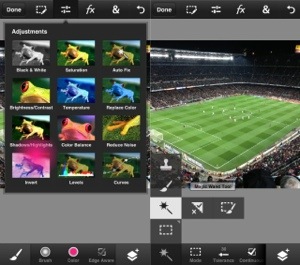
You can now buy Photoshop Touch for the iPhone and Android, and it pretty much does everything you can do on the iPad version.

It’ll costs $5, and features filters, to layers (and super-easy layer styles), scribble select tool to the Camera Fill feature (insert camera images straight into your document), which is even more useful on the portable iPhone.

You can also use the app in any orientation, even upside-down in portrait.

At least this is a lot less than the desktop version.

20130227-140226.jpg