Samsung has gone on official record that it wants to overtake Apple and make the best quality and higher selling tablet than the iPad.
Good luck I say. Competition is always healthy.
Samsung has gone on official record that it wants to overtake Apple and make the best quality and higher selling tablet than the iPad.
Good luck I say. Competition is always healthy.
As promised earlier in the summer, Sony has announced that owners of the Xperia Z1, Xperia Z Ultra and Tablet Z can get a range of digital goodies.
On offer are 10 games and 5 movies, all completely free. Sony’s offer also includes a 60 day free trial to its Music Unlimited service, available to those that have yet to sign up.
Of course these are only available if you own an Xperia Z1, Xperia Z Ultra or Tablet Z. To find the offers just open the Xperia Privilege app.
There are a few games titles from PlayStation Mobile, such as Hungry Giraffe, Tokyo Jungle Mobile and Ten By Eight, and some movie blockbusters including Elysium and The Amazing Spider-Man.
Free offers are always appreciated.
All Things Digital reported the following “Lenovo’s long-rumored bid for languishing smartphone pioneer BlackBerry might have gained its legs were it not for the interference of the Canadian government.”
But the question remains would the Canadian government now bankroll BlackBerry out of trouble as they prevented its sale? I doubt it. So if the government was so concerned about its security surely it should be offering more support.
What do you think ?
Screen captures are a great tool to have and it seems Google agrees.
To take a basic screenshot is as simple as just holding some buttons to snap the screen. With Android 4.4 phone connect it to a computer running ADB, send over a quick command, and the phone starts recording its screen output, right to a video file in its internal storage. Clips can be up to three minutes long.
I might just get the Nexus 5 just to try out this feature. Well that’s my excuse!
In a meeting with its concerned investors on Wednesday, the head of Samsung Mobile revealed numbers illustrating that the company sold fewer high end smartphones than Apple this year, and that only about a third of the company’s total “smartphone” shipments are of a class really comparable to the iPhone.
Samsung did concede that it would sell around 100m Galaxy S and N models this year but would not split down the figures any further.
Samsung is believed to be focusing on lower end phones in 2014 more than it’s high end offering.
This doesn’t surprise me as the smartphone market is reaching saturation and only developing economies might offer future growth.
Hence why the smart watch and other new tech is needed to boost sales in the future.
Have a look at this video from Pebble.
Pebble announced last night “First, we’re introducing a more delightful user experience for Pebble customers using iOS. Pebble is now fully integrated with iOS 7 and works seamlessly with Notification Center. This means that any notifications you’ve enabled in Notification Center on your iOS 7 device will appear on your Pebble — just like that. It’s easier than ever to pick and choose which updates you want to see on your watch.”
Pebble’s new software capabilities include Yelp, which will serve up local data to the watch, and Foursquare, which will allow users to check in from the device. Pebble has also worked with GoPro to create a watch app that controls the latest version of the adventure camera. Remote-controlling other devices and apps is a growing area of interest, Migicovsky said.
Pebble also announced that it now has all colours of the watch in stock.
And there is a limited offer of free worldwide shipping.
Anyone tempted?
I have had the iPhone 5S for over a month now and have been using the camera more and more. Have a look at my latest photos on my Flickr account. Click here http://www.flickr.com/photos/gavinfabl100/
Out of all the smartphone cameras I have used, I am really impressed by this phones’ camera. It consistently outperforms what you would expect it to do. And the quality of the shots are so well balanced and with natural colouring.
All I need is a Lumia 1020 to try and maybe I might change my mind.
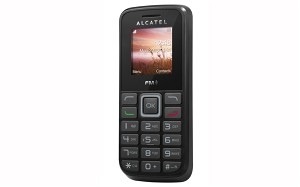
Don’t get too excited. The Alcatel 1010 has a 1.45-inch screen and weighs 59g. It comes with 3MB of memory, a in-built MP3 player, wireless FM radio and a handsfree function.
And at £5 via Asda it’s the cheapest phone on sale in the UK. Just offers extremely basic operation. Ideal if you make calls on your phone or as a dreadful backup.
Don’t all rush at once!
My favourite Android keyboard is Swift Key. It’s has just been updated on Google Play and the Amazon App Store. The tablet and standard version have now become a single app.
If you purchased SwiftKey Tablet from Google Play, you will be updated to the unified version. Go to the Google Play Store on your device, log in with the account you used to purchase SwiftKey Tablet, and look through your list of “My Apps”. SwiftKey Tablet will be in this list available to download at no extra cost. Unfortunately SwiftKey Tablet will not show up in search – this is a limitation of the Play Store.
If you purchased SwiftKey Tablet from the Amazon Appstore or AndroidPIT, please contact their customer support teams at http://www.amazon.com/appstore-support or http://www.androidpit.com/faq to request that your purchase be transferred to the main SwiftKey app.
The new version gives you access to three keyboard layouts, all of which can be resized, and undocked and positioned where you choose on your screen.
Compact: On many larger phones it can be difficult to enter text and hold the phone with just one hand. This new feature reduces the width of the keyboard and allows for easier typing with one hand or gesture typing using SwiftKey Flow. It also frees up more of the screen estate on tablets. You can switch it from the left or right side of the screen.
Thumb: For those who like typing on tablets in landscape or wide phones, the keyboard can be split into two areas, enabling fast, comfortable typing with both thumbs. Undock it from the base of the screen for even more flexibility.
Full: The traditional full-width keyboard is still available and users with tablets can opt for an extended layout that is similar to the presentation of a physical keyboard. This layout has left and right cursor keys and the backspace is positioned above the enter key, making it easier to type with two hands when not holding your tablet
Just click the link to YouTube clip showing the LG Flex being bent slightly. Link here.
This is the phone that claims to have a self repairing back.
 Gavin's Gadgets & Photography