Category Archives: Tech News

What price are we paying for the internet revolution?

A few nights ago, BBC’s Panorama featured undercover recording of Amazon’s warehouse in Swansea.

Graduate Adam Littler, 23, said he walked up to 11 miles as he worked 10-and-a-half hour night shifts inside the online retailer’s giant distribution centre in Swansea. He was expected to collect a customer order every 33 seconds and said he was subjected to ‘unbelievable’ pressure to meet efficiency targets.

He carried a scanning machine that tracked his position in the vast warehouse and bleeped every time he scanned the wrong item, and also had a count down timer after each scan providing remaining time to the next item.

Amazon’s practises all seemed legal, but they did seem to employ a huge amount of agency workers(temps) that don’t have any statutory rights like a full time employee.

Leading experts commented that this type of pressure from both a physical and mental point of view was horrific. Amazon received millions in grants and even had roads built for its warehouses.

So, lets some this up. With one click you receive goods that are low priced and from a company you trust. This same company then uses humans as robots, disposes of them once they are mentally and physical expired and at the same time destroys small and large companies. The small and large companies haven’t received millions in grants, and more than likely have paid a fair amount of corporation tax, something Amazon seems very shy about.

But would all this insight stop you buying from Amazon?

A radical thought – is the MacBook Air 13 inch being merged with the iPad Air Pro

Here’s a thought I was thinking about the other day.

Rumours seem to indicated that Apple is building a larger iPad, at a 12.9 inch screen. This is rumoured to be called the iPad Pro. But then I got thinking, why would you need a Macbook Air, why not merge both products into one.

How would this be done? Well simply. Create the large iPad Pro at 12.9 inch and have a keyboard that clicks on with magnets that also acts as the screen cover.

So do you think this is science fiction, or a future reality. My view is Apple will move towards this form factor, but not instantly. Maybe in 1-2 years. Apple have been known to bring out a new product which destroys another of theirs, so I do not think this setup is unrealistic.

Nokia offering £20 worth of apps free with selected new phones

If you buy Nokia Lumia 1020, Nokia Lumia 925, Nokia Lumia 625 or Nokia Lumia 1520 and Nokia will throw in a free Windows Phone Store voucher worth £20. The offer only applies to original purchases of the specified Nokia Lumia smartphone models from authorised retailers in The United Kingdom made between 15 November 2013 and 15 January 2014.

How to get your free app voucher:

1) Buy a new Nokia Lumia 925, 1020, 625 or 1520.

2) Head over to http://www.nokia.com/gb-en/apps-voucher/redemption/ and get your free £20 credit.

Full details on offer available at http://www.nokia.com/gb-en/apps-voucher/

Use an android phone, now you can use a 2G signal for data even if no internet

Be-Bound for Android is a new way to get your data and it works in more places and it costs less!

Be-Bound ensures that you get your data when you need it – without costing you a fortune on data and roaming charges. It gets your data in data dead zones!

Be-Bound is the first hybrid solution that allows you to stay connected to the Internet on your Smartphone even when there is limited or no data access.

It’s easy to:

– Add your Email and Twitter accounts
– Get your News, Weather, Sports
– Find local points of interest
– And access most of your favorite apps: real-time stock exchange, currency converter, translator, flight tracker, GPS navigation…all built in.

This is an ideal application for those that want data access in dead zones and hate spending big bucks on roaming charges while abroad. Using our proprietary compression technology, Be-Bound allows you to get your data while only paying text message charges (in many cases free) and inexpensive Be-Miles. We are offering you free Be-Miles to get you started.

Have you ever noticed that you can sometimes send a text when you appear to be out of cell data coverage? Be-Bound allows you to stay connected to the Internet when you have limited or no data access (3G, Wi-Fi, EDGE) at a very low cost.

As long as you can still give a call or send a text message, Be-Bound will switch to its proprietary data mode to send requests to our servers to get the information you need. Each request will cost you standard text message rates and Be-Miles (prepaid credits), which are inexpensive and controllable. You can view your Be-Miles current balance anytime.

Using Be-Bound in your data plan on 3G or Wi-Fi is free. Using Be-Bound on 2G networks internationally could generate international SMS costs. Check your plan for SMS and International SMS costs.
Purchasing Be-Miles will give you access to multiple Be-Bound services. The number of Be-Miles charged depends on the service. For example, consulting the weather or stock service will cost 1 Be-Mile but reading an email may cost several Be-Miles, depending on its size. Be-Bound is compatible with most Android handsets.

20131126-073935.jpg

Apple’s iCloud Photostream limits have changed – full details and a few surprises too

If you have an Apple device and are using the iCloud Photostream, it is no longer restricted to 1,000 photos. See below for new information.

1) iCloud: My Photo Stream and iCloud Photo Sharing limits –
There is no limit to the number of photos you can upload to My Photo Stream over time, but iCloud limits the number of photos that can be uploaded within a given hour, day, or month to prevent unintended or excessive use.

2) My Photo Stream upload limits –
The My Photo Stream limits below are established based on anticipated upload patterns. Currently, My Photo Stream upload limits are as follows:

Uploads to My Photo Stream per hour: 1000 photos
Uploads to My Photo Stream per day: 10,000 photos
Uploads to My Photo Stream per month: 25,000 photos

If you exceed one of these limits, your uploads to My Photo Stream will be paused temporarily and you may see a notification message on your device. Your uploads will resume automatically after you no longer exceed one of the limits, such as in the following hour or on the following day.

3) iCloud Photo Sharing limits –

The current iCloud Photo Sharing hourly and daily limits are as follows:

Maximum combined number of photos and videos to share per hour: 1000
Maximum combined number of photos and videos to share per day: 10,000
These sharing limits are separate from the upload limits above. For example, in the same day you could upload 10,000 photos to My Photo Stream and then share those 10,000 photos or 10,000 other photos.

Some additional limits for shared photo stream usage:

Maximum shared streams an owner can share: 100
Maximum shared streams a user can subscribe to: 100
Maximum subscribers per shared stream: 100 (the number of subscribers on each shared stream)
Maximum number of photos per shared stream: 5000
Maximum number of comments per shared stream photo: 200 (a comment can be either a Like or a text entry)
Maximum characters per comment: 200
Maximum number of invites a shared stream owner may send per day: 200

Notes
There is no limit to the amount of photos you can upload to My Photo Stream over longer periods (such as several months or years). Photos uploaded to My Photo Stream or shared photo streams are not counted against your iCloud Storage. The photos that you upload to My Photo Stream are stored in iCloud for 30 days to give your devices plenty of time to connect to iCloud and download them.
The following image file types are supported for Photo Stream: JPEG, TIFF, PNG, and RAW.
The following video file types and file formats are supported for iCloud Photo Sharing: MP4 and QuickTime file types, and H.264 and MPEG-4 Video file formats. Videos can be up to 5 minutes in length.

When importing photos to an iPad using the Camera Connection Kit, photos are saved directly to Camera Roll. If Photo Stream is enabled and you are connected to a wireless network, you could potentially reach any of the limits listed above. To avoid this, disable Photo Stream when importing photos to iPad when using the Camera Connection Kit.

When importing large numbers of photos to either iPhoto or Aperture, you could potentially reach any of the limits listed above if you have selected Automatic Upload in the Photo Stream preferences. Both iPhoto and Aperture will pause uploading to Photo Stream when the maximum has been reached. Uploading will automatically restart at the next hour, day, or month, depending on which limit was reached.

Apple granted patent for taking pictures with your phone

A patent has been granted to Apple for a Light Field camera – a camera with zero shutter delay and where the focus point can be changed after taking the photo – covers the precise technology Steve Jobs told biographer Walter Isaacson he wanted to use to reinvent photography.

The patent refers to a “refocusable imaging mode adaptor,” and the abstract perfectly describes a Light Field camera:

A digital camera system configurable to operate in a low-resolution refocusable mode and a high-resolution non-refocusable mode comprising: a camera body; an image sensor mounted in the camera body having a plurality of sensor pixels for capturing a digital image; an imaging lens for forming an image of a scene onto an image plane, the imaging lens having an aperture; and an adaptor that can be inserted between the imaging lens and the image sensor to provide the low-resolution refocusable mode and can be removed to provide the high-resolution non-refocusable mode, the adaptor including a microlens array with a plurality of microlenses; wherein when the adaptor is inserted to provide the low-resolution refocusable mode, the microlens array is positioned between the imaging lens and the image sensor.

Looks like cameras on phones are going to get better and better.

Final thoughts on the Nokia Lumia 1020

I’ve had the Nokia Lumia 1020 for around 2 weeks courtesy of Nokia.

I really enjoyed the Lumia 1020. I preferred it over the Lumia 925 as I preferred the polycarbonate build over the Lumia 925 aluminium frame. I also loved having the top notch 41mp camera. I took some fabulous photos and having the immense detail has proven invaluable.

If I was being extremely nit picky I wished the phone camera software had a HDR mode. In fact, talking about modes for novices I think have some preset shooting modes eg waterfall, fireworks, action etc would be great. Once again in a relatively short space of time window phone apps have improved. Couple that with the new processors and upgrades to the operating system, and you have an alternative to android.

I don’t know why, but I actually prefer windows phone to android. As I mentioned yesterday, I’m looking forward to the Lumia 1520.

iOS Games updated for game controller support – details

iOS game controllers from Moga and Logitech have just been announced. So at present the list of games supporting these controllers is small, but expect the number of games to explode in a short period of time.

Moga has set up a page here which gets regularly updated with all games that support iOS. They also have a list for android games that support is android game controllers.

Logitech also has a page of compatible games, click here which seems to include extra games over the Moga. However, I’m sure the Moga will work with all these one too.

However, I’ve compiled a list too.

Airwings
Airwings Intergalactic
Asphalt 8
Aztec Antics Bouncing Ball
Bastion
Blastron
Bike Baron
Brothers of Violence 2
Bugdom 2
Call of Duty Strike Team
C.H.A.O.S.
Cro-Mag Rally
Dead Trigger 2
Death Worm
Fast & Furios 6 – The Game
Graalonline
GunnerZ
Ice Rage
Into the Dead
King Oddball
Lego The Lord of the Rings
Lilli
Limbo
Metalstorm Aces
Minigore 2 Zombies
Muffin Knight
Nanosaur 2
Neon Shadow
Nimble Quest
Nitro
Nucleus
Oceanhorn
Otto matic
Pacman
Paint it Black
Phoenix HD
Ravensword Shadowlands
Real Steel – World Robot Boxing
Scribblenauts Remix
Silverfish
Silverfish Max
Spiral Episode 1
Stealth Inc
Strikewing Raptor Rising
Super Lemonade Factory 1 & 2
Tennis in the Face
The King of Fighers i 2012
Touch Tanks 5 Online
Trials Xtreme 3
Trouserheart
The Walking Dead The Game

Moga Ace Power Game Controller for iOS – Review

Moga are well known for their android compatible game controllers. They have now brought out an official Apple approved and certified game controller for your iPhone 5C, 5, 5S and the latest generation of iPod Touch. It only works if you have iOS 7 installed as this has the new native game controller APIs installed.

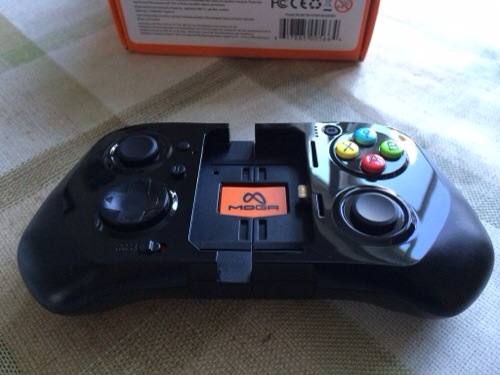
Scroll back a few articles to see my current list of games supported by the game controller. Also note, that it seems the list is growing very fast on a daily basis. Or to see all my articles on the Moga Ace Power click here. So what does the controller look like.
20131123-132508.jpg
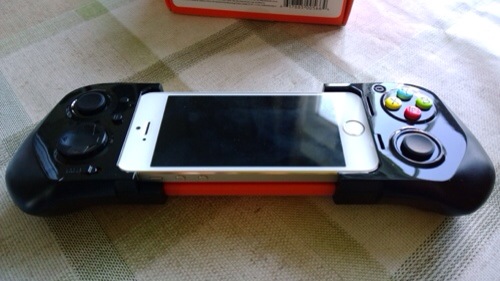
Here it is in its locked closed position. It then expands to fit safely and securely the Apple device. Shown below is the iPhone 5S.
20131123-132607.jpg

In the box is the controller, instructions, USB micro lead for charging it, and orange plastic inserts. By default the black plastic inserts are installed. This is for the 5S. If you have a 5C you need to remove all the inserts. If you have an iPod Touch you need to use the orange inserts which raise the iPod to be level with the lightning connector. So how does it all work. Well, you first charge the controller, insert your iPhone and lock the slider using the switch under the controller. And that is it since iOS 7 has game controller built in to the operating system, there is zero configuration needed. There is a front sliding switch to allow the Moga to charge your device. This obviously depletes the controllers battery but when it reaches 25% charge it won’t charge the iPhone any more. The Moga has a 1800mah battery. I haven’t been able to obtain conclusive battery life tests but will update this article in due course. The Moga features pressure sensitive and analog controls. In fact, if you use a PS3 controller or similar, you will be right at home with this. In addition there is a battery level button to reveal how much power is left in the controller. There is also a pause and lock button switch. As it uses the lightning connector, the sound is carried through via this method, which means and the right side of the controller is a headphone jack. You cannot use the headphone jack of the iPhone or camera as both are covered.

So the burning question. What is it really like. Well, if you read the reviews published already they only give the controller an average score and at first I was agreeing with that too. However, it was clear these reviewers didn’t spend much time with the controller, as after using it longer I realised it was better than my original thoughts. The Moga Ace Power does feel cheap plastic compared to its android Moga offerings. I have realised part of this feel is due to the sliding mechanism which makes it feel flimsier. Regardless it still gives the wrong impression in terms of quality and this is slightly disappointing especially as this cost £90. In reality, it works and so far exhibits no hardware failings. Once your iPhone or iPod is clamped in position, the whole controller becomes a solid piece and feels rather reassuring. In fact, the longer I have had the Moga the more I have grown to like its design. The list of the iOS games compatible with game controllers exceeds 50, but like everything in life some are better than others. Come love not money, I could not get Asphalt 8 to work. I wasn’t that upset. It is a great game ruined by in app purchases, as are a number of games nowadays. So like most things in life, a little exploration reveals that there are some fantastic games that work really well. And generally, these games have more depth too so end up being the sort of game that would benefit from a game controller. So when I nailed a good game, the experience was mesmerising. The potential is incredible. iOS has the best game selection out of any platform. And as developers fine tune their games to support native controllers the world is open to a new level of gaming. That is providing developers don’t ruin their games with in app purchases. Tim Cook did you hear me. Stop iOS games getting ruined by greedy developers !

To help you these are my favourite titles that I have enjoyed using the Moga Ace Controller – Aztec Antics, Bastion, Bike Baron, Dead Trigger 2, Death Worm, Galaxy on Fire 2 HD, Ice Rage, Limbo, Minigore 2 Zombies, Neon Shadow, Oceanhorn, Pacman, Silverfish and Strike Wing Raptor Rising. The only bug or fault is the back light dimming and then the phone locks. This is due to the fact that my iPhone was set to auto lock after 1 minute. And the controller on some games doesn’t prevent this.

The Moga Ace Controller works really well but will be even better as more games get optimised. I wish Moga had used a higher grade of plastic, but once the phone locked in, it does as mentioned before a solid piece. One other game controller available is the Logitech Powershell. This won’t be available in the UK for another few weeks, but doesn’t have the full range of controls like the Moga. Other game controllers are certain to be made available by other companies over time. But the key factor, is software updates by developers. The good news is that iOS 7 includes game controller support natively so it shouldn’t be too difficult for developers to implement. So using airplay and an Apple TV with your game controller you now have a complete console solution. You can see where the future is moving!

So should you buy it. My answer is yes “if” you play games. Despite the drawbacks of this new piece of tech being new, your iPhone or iPod takes on a new lease of life when it comes to games. It is so much better than using physical controls and not having your fingers cluttering the screen. Just be prepared to buy a few new games to get the most out of it until other mainstream titles get updated accordingly. And that may take anything from tomorrow to several months for the titles to get updated.

Update. I’ve noticed a rapid number of game updates all adding iOS game controller support and they seem to work really well with the Moga Ace controller.