Category Archives: RIM

Apple TV is here already. CES exhibitors are in a frenzied panic

If you have been reading the tech news you will already know CES is upon is this week. All the major companies are trying to second guess what Apple is going to announce or release with their TV.

Everyone, you are all too late. Apple has done it already. They will probably see what gets announced at CES and then go and tweak their offering.

For £100 you have the Apple TV already. It’s content is fuelled over the Internet. The controllers already exist in iPhones, iPads and iPod Touch’s. All Apple have to do is a software update, and open up the Internet content to include games and apps, more services and content.

Game over or is it ?

How Many Apps & Games Do You Own – Logic Analysis

Time to own up. Are you a person who buys an app, uses it fully and until such time will only purchase another app if it does something different?

Are you a person who buys a game, plays it to the end and then might consider buying another app?

Or are you the sort of person, who sees a few games promoted or reduced and buys several at a time?

I would imagine many of you fall in to the category above. I know many people who have over 500 apps/games. If you ask yourself seriously, do you ever use all those apps, do you really play all those games. Answer is no.

So, here’s a challenge. Look at all your apps and games and only keep on your device the top 20. See if you can survive a day, then a week and then a month.

Let me know how you got on below in the comments.

NFC – Unlock your Doors – Would You Use it?

At present several android phones have NFC built in. I used it when I had the Samsung Galaxy S3 with tags. These little tags were programmed to do certain actions. So when I got in the car, one swipe over the tag meant my S3 had been switched into Car Mode, Bluetooth on and volume at full blast. When I got home, I swiped the NFC tag by the hall table. Wifi was switched on, vibrate and silent turned on, Bluetooth turned off and my news feeds started fetching the news.

NFC can also be used to pay for services. But now there are plans a foot to use NFC as your car and house keys. One swipe over the lock and your car is unlocked and the same for your front door.

Now this all sounds good but what about the security implications. 10 years ago if you lost or had your phone stolen, it was a pain but that was about it. Nowadays if you have your phone stolen, it is more likely to be a smartphone worth £300-£700. So first up you have the actual cost of replacement. Then there is all the sensitive data and data apps hold on your device. Would you then feel happy if your phone was also the keys to your property and car?

Sadly, the way technology is moving forward this is more than likely to happen.

What do you think?

To Use a Case or Not – Are we Mad?

You have just unboxed your new device. It looks amazing. It’s so thin and feels wonderful.

So what do you do next? Buy a case and conceal its beauty. Do you use a Otterbox Defender type case and bury your phone is heavy duty protection. Or do you go still for some form of protection but not as over the top as the Defender range.

But it doesn’t stop there. You can then decide on a slim back cover or bumper style. In fact the options are endless. You have colours and materials to choose from, the size, protection and design and so much more. For each phone I have owned I have over time had 30-40 cases. It was like trying to find the perfect device made of the perfect material and designed so well it adds to the device rather than take away any style. There are aluminium cases and bumpers. These do look ok and some cost the earth. They also reduce your signal strength. This to me is a poor design. Why build a case that reduces the signal strength.

I currently use an iPhone 5 and have around 12 cases. However I have settled on 2 so far. A Gear4 Tread GT for lightweight protection and a Trident Aegis for full blown protection.

I also like using the iPhone 5 without any case.

What do you like to use and why?

Samsung is about to revolutionise TV – has it beaten Apple to Re-Inventing the TV?

Samsung has just released a CES teaser that it is about to revolutionise TV’s as we know them. Below is the photo added to the teaser release.

20121231-181002.jpg

From what I can fathom the TV looks translucent and is portrait in design. My other thoughts are that Samsung is trying to beat Apple to re-inventing and innovation TV’s as we know them.

CES is looking like its going to be superb in 2013.

Blackberry Z10 & X10 phones

A new round of photos have emerged of the new handsets from Blackberry featuring the long awaited and overdue BB10.

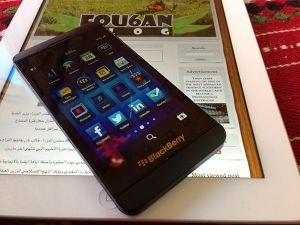
First up is the Z10. This is an iPhone like touch phone. It doesn’t look IMO anything special or different, but maybe BB10 is fantastic.

20121231-075641.jpg

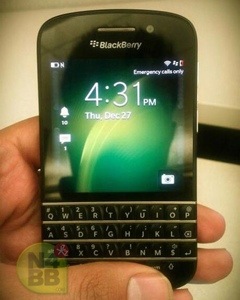
Next up is the X10, which features the traditional thumb keyboard that blackberry made themselves famous for.

20121231-075803.jpg source of photo <a N4BB/ .

It’s only a month away before Blackberry themselves reveal the full glory to the world. However, I am sure we will see many more leaks.

Are you excited about the new Blackberry handsets and operating system?

Twitter – Control it Totally via SMS

Did you know you can completely control twitter via SMS. Go to your twitter profile and add your mobile number and allow SMS control if asked. Make a note of the twitter SMS number.

Twitter SMS Commands –

Turning mobile Twitter updates OFF and ON:

ON: turns ALL your authorized Twitter updates and notifications on.
OFF: turns ALL phone notifications off.
ON [username]: turns on notifications for a specific person on your phone. Example: ON alissa
OFF [username]: turns off notifications for a specific person on your phone. Example: OFF blaine
FOLLOW [username]: allows you to start following a specific user, as well as receive SMS notifications. Example: FOLLOW jerry, or F jerry, for short.
UNFOLLOW [username]: allows you to stop following a specific user.
LEAVE [username]: this command allows you to stop receiving SMS notifications for a specific user without having to unfollow them. When you log into twitter.com from the web you will still see this user’s updates in your timeline. Example: LEAVE benfu, or L benfu, for short.
STOP, QUIT, END, CANCEL, UNSUBSCRIBE, or ARRET: will deactivate your account if you are an SMS-only user. If you completed the sign-up flow on the web, sending any of these commands to your Twitter short code will simply remove your phone number from your Twitter account.
Fun stuff – friends, favorites, and stats:

Use the commands below to send direct messages, mark Tweets as favorites, and more.

@[username] + message – shows your Tweet as a reply directed at another person, and causes your Tweet to save in their mentions tab. Example: @meangrape I love that song too!

D [username] + message – sends that person a Direct Message that goes to their device, and saves in their web archive. Vital you keep SMS under 160 characters
RETWEET [username] – sends that user’s latest Tweet to your followers
SET LOCATION [place name] – updates the location field in your profile.
SET BIO – edits your Bio information on your Twitter profile.
SET LANGUAGE [language name] – selects the language you’d like to receive notifications in.
SET NAME [name here] – sets the name field on your Twitter profile.
SET URL [url here] – sets the URL field on your profile.
WHOIS [username] – retrieves the profile information for any public user on Twitter.
GET [username] – retrieves the latest Twitter update posted by that person. You can also use g [username] to get a user’s latest Tweet. Examples: get goldman or g goldman.
FAV [username] – marks that user’s last Tweet as one of your favorites (reply to any update with FAV, FAVE, FAVORITE, FAVOURITE, or * to mark it as a favorite if you’re receiving it in real time). Examples: fav crystal, fave crystal, favorite crystal, or *crystal
STATS [username] – this command returns the given user’s number of followers, how many people they’re following, and their bio information.
SUGGEST, SUG, S, or WTF – this command returns a list of Twitter users we think you might find interesting and would like to follow.
HELP, INFO or AIDE – texting help, info, or aide to Twitter will bring up helpful tips.
SUGGEST – this command returns a listing of Twitter users’ accounts we think you might enjoy following.

A few notes on SMS commands:

Using ON/OFF [username] from your phone only stops notifications coming to your mobile phone; you’ll still collect a person’s updates on the web since you’re still following them.
Use UNFOLLOW [username] to unfollow a user via SMS.
Use BLOCK [username] or BLK [username] to block a user via SMS.
You can also use UNBLOCK [username] or UNBLK [username]
Use REPORT [username] or REP [username] to report a user as spam.
The following commands perform the same actions: FOLLOW = ON. And LEAVE = OFF.
Following someone from a phone for the first time will also cause you to follow them on the web.
You don’t have to use ON/OFF [username] from your phone, you can also set individual notifications from a person’s profile page on the web, or check your following page and manage all phone notification settings there.

The Experiment – Using iOS / Apple Exclusively

As each year passes the respective mobile operating companies like Amazon, Google and Apple are trying to push you further and further towards their own offerings. It is becoming clear that at some point in the future you may be forced to make a decision.

So over the next few months I’m going to try using first up Apple and iOS exclusively and then I’ll do the same experiment with Google and android.

So firstly I moved all my pim information into the iCloud and switched my email too. Then I looked at all the iCloud settings and turned everything on from bookmarks, notes, documents, photos, photostream, apps,movies and books. I also turned on iMessage and FaceTime.

So what did all this mean. Welll what I found was no matter what I was on using, (Mac, iPad, iPhone or Apple TV) everything was synced across all the devices without any effort. Also I was able to make a face time call from any device and make that to any other type of device at the other end. In addition with iMessage I could either use my iPhone or iPad to send a text message to another iPhone user. If I took a photo on the iPad or iPhone it would appear on all the other devices with no intervention from myself. It would also be sorted in month order as well on iPhoto on the Mac. If I bought any media (music film app) it would download and install on any of my devices. If I saved a new bookmark on my iPhone that same bookmark would be on my iPad and Mac. If I created a new calendar, contact or a note, again this would be synced across any device. In fact what I’m finding is the Apple syncing and management between all the devices is extraordinarily simple and fantastic to experience.

No wonder people find it difficult to change for one operating system to another.