Samsung has just released a huge 18 minute long video of the Note 3 and Galaxy Gear Watch.
Despite the high cost of these products I am certain Samsung will sell loads.
I must admit it does look so tempting.
Samsung has just released a huge 18 minute long video of the Note 3 and Galaxy Gear Watch.
Despite the high cost of these products I am certain Samsung will sell loads.
I must admit it does look so tempting.

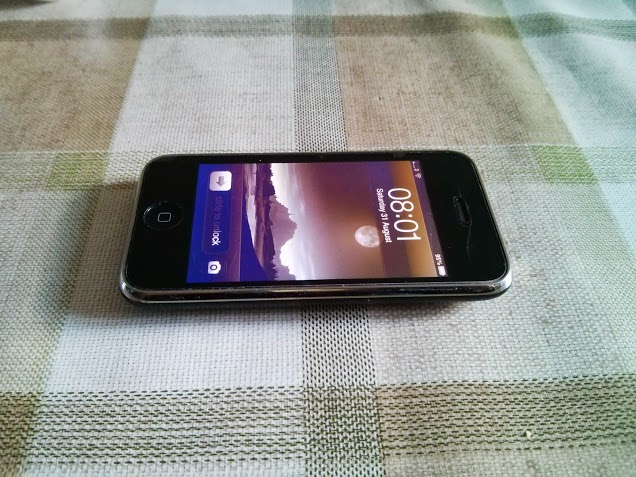
Above is the svelte curves of the iPhone 3GS running iOS 6. Soon Apple is to release the new iPhone, the 5S. This will make the 3GS over 3 years old. So in this revisited article, how does the 3GS hold up against the current crop of smartphones including the current iPhone 5.
First up, in my opinion the 3GS is the most comfortable phone to hold. Just look at the back and the lovely curves. I prefer this shape over the 4/4S and 5. However, after that the 3GS starts to get punished by its competition. The screen is a low resolution affair, that is no retina screen. But it still allows for calls and apps to run. However, as iOS 7 arrives, this will be the first time it won’t receive an update to the latest operating system. That means that new apps/games or app updates will likely start not to support this older model. However, if you have all the apps you require, you will still have a great functioning phone.
The camera is low quality and it shows with noisy photos. Compare that to the iPhone 5 and it is not a fair comparison. The 3GS is really slow opening and closing apps. And it is noticeably slow. But again, if you don’t know any different, then you just adjust. The cell signal and GPS signal are not as powerful as receiving coverage as say the Samsung Galaxy S3/S4. GPS signal often drops when trying to use this in the car.
In reality, if you own a 3GS and it does everything you want, then that is great. But in tech terms it is really starting to show it age. Only one week to go now before Apple unveils its new iPhone(s).
The other day the postman delivered a plain brown box, inside of which was the new Nexus 7 that I had ordered from Google less than 24 hours ago. That was the first surprise. The second was a Nexus 4. Google had reduced the pricing of this phone to £199 for the 16gb and £159 for the 8gb model. That represents great value. Also good timing, as I was due to be returning my Nokia Lumia 925 back to Nokia in a few days.
I recall when Google launched the original Nexus 7. That brought back bad memories. Poor build quality and equally bad customer service experience when trying to return the faulty tablet. It also had a poor screen and audio quality. So the first positive was a 24 hours from order to delivery. The second was the size of the box. It was a lot smaller than I thought. Opening the box and holding the new Nexus 7 immediately felt like a good experience. It was a solid well built tablet. Size wise, it is narrower than the iPad Mini, and as wide as the Amazon Kindle Paperwhite. The N7 is the same thickness as the iPad Mini with a Smart Cover fitted.

Above is a photo comparison between the Nexus 4, new Nexus 7 and iPad Mini. Below is the from top to bottom, Nexus 4, Samsung Galaxy Note, new Nexus 7 and iPad Mini.

So what does the new Nexus 7 represent? The best of Google in an unbloated format in a pocketable 7 inch tablet. The screen is fantastic with 323ppi and makes viewing the iPad Mini rather unpleasant. The N7 speakers are a dual stereo setup with surround sound powered by Fraunhofer (the MP3 inventors). They sound average and I wish they went louder. With several headphones I have tried, the N7 has plenty of guts to power some of my more demanding cans, and sounds above average in quality. I would use the N7 as my primary MP3 device.
Now, the biggest complaint is android on a tablet doesn’t work properly because of the lack of android optimised tablet apps. That statement is true if you have a larger screened tablet, like say the Sony 10.1 inch Xperia Z tablet. But to my surprise, I have not come across any apps that don’t look fine on the N7. I think its balance of width and height just work really well. Only one app does not work, and that is BBC iPlayer, although I am sure that will get updated soon. So in use I am really enjoying the N7. I also have not changed the default launcher. It just works fine on the N7.
Interaction with the N7 is excellent too. It is a breeze to hold it and type with two fingers. If it is purchased on a table, I have found it not so easy to type in landscape at the moment as the keys are too close together. The iPad Mini, with the Smart Cover is keyboard mode, is considerably easier to type using both hands and all fingers, therefore faster. I would also add, that if you do a lot of data input, I would suggest using a full size iPad. The on screen keyboard is so fantastic, I can approach 80 words per minute.
I have installed 80 apps, 32 of which were games, half a dozen 30 seconds videos, 200 photos and still have 21gb free.
The new Nexus 7 is £199 for the 16gb and £239 for the 32gb, and currently Google are offering free shipping. Would I recommend the new Nexus 7. Yes, but I would also recommend waiting a few weeks to see what other companies competing for the same space also release.
But I will leave you with one thought. My iPad Mini 64gb (which I have now sold) cost £439 new. For the same money you can buy a Google N4 smartphone and the new Nexus 7. And this is a problem Apple need to combat.
Update – Qi wireless charging is built into the N7 just like the N4 phone. I received a Zens charging pad and it works a treat with the N7. Also using Google’s full resolution auto photo upload service is fantastic. Take shots on the N4, view them after Google has auto awesomed them on my N7. Photospheres are incredible.
Welcome back to my last part on the Samsung Galaxy S4 Zoom. Earlier parts can be found here.
So, let’s start by saying that I have returned my S4 Zoom, due to one issue / bug that just frustrated me. Annoyingly, everything else about the phone and camera was fine. The battery was removable, it had a micro SD card slot, it was based on the S4 Mini so a competent performer. It also can take good photos and the optical zoom and xenon flash assured you always got a decent snap. It even had preset modes to take the guess work out of what advanced settings you needed for a waterfall, fireworks, and many other scenarios photos. It even had a centre button, handy for turning the phone on whilst sitting on a table.
But for a camera first, phone second device, it was a weakness or fault in the panoramic mode that let the device down. As mentioned already, panoramic photos were being captured at only 400-600kb maximum file sizes, resulting in poor pixel count and not acceptable for a camera phone.
However, if you never take panoramic photos, then the S4 Zoom is a fantastic piece of kit. Sadly, I do take many due to living in a very scenic place, and consequently the Samsung Galaxy S4 Zoom has been returned.
Nearly a week ago I received the Huawei Ascend P6, currently the worlds thinnest device. Since then I have stress tested the phone to deliver my verdict. Huawei describe the P6 as –
– Slender and beautiful – the Huawei Ascend P6 is just 6.18mm thin
– Incredibly strong – it’s built with an aluminium alloy frame & back cover
– Packed with tech – including a lightning fast 1.5 Ghz Quad core processor, and huge 4.7” HD screen all – making P6 ideal for entertainment (like Movies and Catch up TV) as well as over 700,000 apps from Google Play.
-Premium camera experience – P6’s 8 Megapixel camera with Flash, shoots in low light, shoots close ups and is packed with tech to make it simple to use
-It’s all about you – P6 is a social networker’s dream. It has a sensational 5 Megapixel camera on the front – which is ideal for the group shots and video calls you, your family and your friends have to be in.
Huge 2,000 mAh battery with Huawei’s Power Management to optimise battery life
The P6 is insanely thin. Look at the photos below.

The right hand side has the power and volume buttons, sim card and micro SD card trays. The left side just features the headphone socket.

The headphone socket normally is covered with a pull out metallic button, which has the pin to open the sim and memory card trays, but if you listen to music and take this button bit out, you will lose it, so it is best just to leave it out and store it in the phone box.
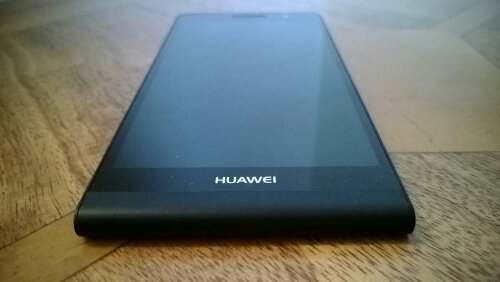
The bottom of the device just has the microphone. The top has the micro USB slot, which also does USB OTG.

So, then you read the user manual, all 107 pages, and start setting up the Ascend P6. The user manual reveals a specification sheet off the charts. It just does so much.
So what were the first impressions. Well within 30 minutes I had my first software force close. This was only trying to add 4 new apps, and do a quick setup so that I could go out shopping with it. When I returned back home, I continued to install the remainder of my 90 or so apps.
So, within the next 2 hours, I had 5 software force closes, 1 random reboot, and a reboot I did as I could not access the notification bar to clear the received notifications. The phone screen in bright sunlight is difficult to see. The phone is use gets a little warm. I tried to use Google Maps and Google Navigation. Nothing was happening. Even though the phone said GPS fix had occurred. At this point I was ready to throw the phone in the bin. Then suddenly after 2 hours, the GPS just started to work. I wonder if I had done something wrong with location settings? In the car with outdoor profile selected, Google Navigation running, bluetooth on and connected to my car, the phone got too hot and stopped charging. This is a safety measure implemented by Huawei to prevent overheating. After a while it started charging again. Soon the notification led turned green to indicate fully charged but battery meter said 93%. Clearly with all the few issues I have been having, the phone probably needs a software update which I am sure will come soon.
Despite the camera specification, the camera is just average. Low light or indoors photos are noisy but then so are most smartphone cameras. The camera is fine for social network sharing but as a comparison to the Nokia Lumia 925, the 925 produces better shots than the P6 is every way possible. But here’s the strange part. Adjust the camera settings from 8 to 6mp and the photos are much better. In fact some were quite good.
The P6 comes with its own launcher, which has over 160 customisable options. I quite like it. It also removes the app tray, and just uses home screens. Genius idea and very iPhone like. It also has a permissions manager, and at first when you get these notifications that an app is carrying out a push message, it is rather a surprise, but actually it is a good security feature. You can then allow or deny access. In fact, for every app you can control whether it is allowed to connect to the internet, or access other aspects of the phone. Neat again. The P6 has built in profiles, editable too. The launcher has themes. Each theme from the locks creen to the icons to the wallpaper and sounds are customisable. I could go on and on. The list of tweaks and options is like a battleship.
Then there is the screen which is rather pleasant at 720p. The sound through the rear speaker is above average. Sound through the headphones is rather metallic, but audio components do improve with burn in. And thats what happened with the P6. After 5 hours of listening to music, the sound was marginally better. Not HTC One quality but passable. Audio via bluetooth is poor.
In the box was the usual affair, phone, booklets, usb lead, UK plug AND a silicone case. What a surprise!
I get software force closes daily. Since Google + received an update, opening the app causes a force close. Again, hopefully with a software update these problems will hopefully be fixed.
The P6 has loads of positives and maybe if it received a software update, this might improve matters. For some people this phone is might ideal. At just over £300, you do get a striking piece of hardware, expandable memory with the micro SD card, average camera and sound via headphones, above average loudspeaker and a silicone case.
I have had the Huawei Ascend P6 nearly a week. My main review is live tomorrow, so in the meantime I have attached 3 photo samples.
In bright sunset light, using HDR mode.
Using digital zoom, I zoomed in from about 4 metres away. Then cropped the image slightly to get this shot.
This is from the 5th floor looking out over a high street. I used on of the photo editing filters to make it slightly more interesting.

The above were all take at 6mp resolution instead of 8mp. The last shot was taken at 8mp. Oddly, any photos I have taken at 6mp widescreen have looked a lot better quality. Also, no editing of colours etc have been edited on the photo below.

The photos are passable but I don’t below they are anything better than that. What’s your opinion?
Firstly, the Lumia 925 does not have an optical zoom, so zoomed photos will be difficult to compete with. So with this in mind, I took the same photo in perfect lighting conditions to see which phone took the better shot. Auto mode was used for everything.
S4 Zoom

And now the same shot with the Lumia 925

So what do you think? Can you tell the difference. The Lumia 925 looks better, more vibrant colours, but there is more detail in the S4 Zoom shot. The S4 Zoom shot allows you to zoom in on photo and captures more detail at a higher magnification than the photo by the Lumia 925. But I actually prefer the overall shot from the Lumia 925.
Welcome back again. To recap on the earlier review sections, click here.
In part 4, I am going to comment on areas or features I am enjoying and worth a mention.
1 – The first thing I have noticed is the persistent clock on the lock screen. It is a digital clock and it is always visible. Something so simple, yet so useful, just being able to glance down and read the time, without having to press a button.
2 – Double tapping the screen to unlock the lock screen. A simple idea that just works really well. I also like some of the lock screen options. See screen shot further down of my bird.
3 – Having a dedicated camera button is excellent. Press and hold from the lock screen to fire up the camera, half press to focus and then shoot. Also tapping on the screen to take a photo is another feature I really like.
4 – The camera really does take some smashing photos, both indoors and outdoors. Low light is not much of an issue for the 925 so once again lovely photos are snapped.
5 – Nokia include a large bundle of software from free internet radio music streaming, photo editing, camera tricks, maps and turn by turn navigation to name a few of my highlights.
6 – Google email, contact and calendar worked out of the box
7 – Even though Google mail is available, if you have a Windows Phone you really need to accept you will be drawn towards Microsoft’s products. And that is not as bad thing. You get Office out of the box. Skydrive is Microsofts cloud solution, and I like the idea that my photos are uploaded to it.
8 – Several months ago, I had a Lumia 620, and when I entered my hotmail email, the Lumia 925 restored all my data, including text messages. I was surprised. No apps were restored though.
9. On the app front, I have managed to find all the apps or an equivalent in the Windows Marketplace (app store). It seems to have got a lot better, even in the last 3 months. However, it is not at the maturity of iOS and android. One area that has shot forward is games. NOVA and HALO and now in the app store and there are some new games appearing that are not available on other platforms. However, the app store allows you to trial software, and then if you like you can buy it. Now that is a concept I would like adopted by android and Apple.
10. The menus and layouts. I simply love the large oversized text and screens. Just makes viewing the device that much easier.
11. The keyboard – the best. It is so easy to enter text on the keyboard, and the screen responsive is superb.
12. The negatives are really not the Lumia 925’s fault, but that of Windows Phone 8. It needs a notification centre. Or a live tile that accumulates every missed notification.
13. The design and build of the Lumia 925 is in my opinion stunning.
14. The audio quality through headphones is really excellent. Dolby surround sound is available too. Options like audio levelling are handy. The loudspeaker is ok, a bit tinny.
15. Battery life. Still early days but it seems to me that it can last a day.
16. The only aspect I am not too keen on is the micro usb port being at the top of the device.
17. Memory. The Lumia 925 is 16gb, which had 12gb free after first installation.
In summary, it is a very good phone to use that takes excellent photos.

In this part I will look at the zoom aspect of the phone. If you are interested in the earlier parts, click here.
So below is a photo I took at the weekend, just in auto mode and without zoom.

And now with a small amount of zoom, about 4 x zoom. This enabled me to zoom much closer to the tor in the middle of Burrator Reservoir, Dartmoor.

It was taken from a slightly different angle, but on the same walkway.
Its odd, but now I know I can zoom in and take good quality photos, I seem to be using the zoom function a lot more. In fact I would say at least 50% of my photos taken have some sort of zoom used. This was another example of the zoom, but this time at full 10 x zoom. This enabled me to lose some of the power lines on the right side.

One last point, none of the S4 Zoom photos have been edited on my blog. They are as identical to how the phone shot them.
Okay, some more 925 camera samples using panoramic and smart camera, plus some other varied shots.
Smart Cam

Close up

In to the sun
And finally a panoramic shot

 Gavin's Gadgets & Photography