Category Archives: Apple

Apple Q4 2012 takes the lead in the US

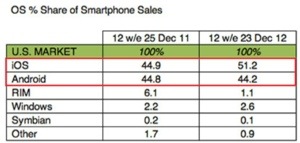
According to data released by Kantar Worldpanel ComTech on Tuesday, iOS accounted for 51.2 percent of all U.S. smartphone OS sales for the 12-week period ending on Dec. 23, 2012, up over 7 percent from 44.9 percent in 2011.

Apple’s increased performance appears to be at the cost of Android as Google’s mobile OS marketshare declined from 44.8 percent in quarter four 2011 to 44.2 percent over the same period in 2012. Also seeing a contraction in marketshare was beleaguered BlackBerry maker RIM, which suffered a drop from 6.1 percent of smartphone sales in the last quarter of 2011 to 1.1 percent during the same period in 2012.

“In particular, 36% of iOS sales were derived from other smartphone users over the last year,” said Kantar Worldpanel ComTech analyst Mary-Ann Parlato. “While this figure remains stable over time, the proportion of Android users moving towards the Apple brand increases. 19% of iOS sales over the last year were derived from Android users, compared to 9% in 2011.”

So if this set of results is correct, it appears the iPhone 5 was more popular than envisaged. In a few days time we will find out for sure.

20130122-073708.jpg

How to Add Apps into the Newstand Folder

This is a really neat trick , and doesn’t require any jailbreak. This YouTube video shows you how.

So to recap, these are the quick and easy steps.

Step 1: Place the Newsstand folder anywhere on the second page of the Home screen.

Step 2: Place the apps that you would like to move into the Newsstand folder on the third page of the Home screen.

Step 3: Swipe to the third page of the Home screen containing the apps that you would like to move.

Step 4: Press the Home button once, and then immediately tap and hold on the app that you wish to move.

Step 5: Continue holding on the screen until the Home screen moves to the first page due to your press of the Home button.

Step 6: Release your hold on the screen and immediately swipe back to the second page containing the Newsstand folder

Step 7: If the trick worked correctly, then you should see wiggle mode enabled.

Step 8: Tap on the Newsstand folder to open it, and then press the Home button once to close it.

Step 9: You should see the app that you tapped and held on in Step 4 move into the Newsstand folder.

20130121-224548.jpg

Real Racing 3

This is the sequel to Real Racing 2, and the third instalment is meant to be significantly better. Due for a release next month, here is some of the features.

Real Racing 3 lets gamers compete against friends and rival drivers from around the world. Fans can race on real world circuits with powerful dream cars from all-new manufacturers like Porsche, Audi, and Dodge. With the improvements achieved with Real Racing 2, the team aimed to raise the bar on expectations and continue to give their artists the ability to create the most realistic graphic effects on cars on an individual basis. Including realistic reflections, customizable cars and improved details down to glosses and finishes, Real Racing 3 delivers the unique experience of speeding in some of the best cars on world famous race tracks.

Here is a link to the YouTube promo

Are you excited ?

20130117-184730.jpg

iPad Calculator Apps

I use 2 alternative calculator apps. Both are different and good to use.

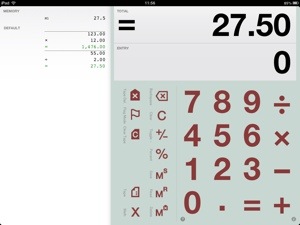
Digits
Digits is great for:
Adding up expenses, labeling and emailing them, doing a quick calculation and being able to double-check and correct entries with ease, entering a long series of calculations and then emailing it to yourself for import into Numbers or Excel, Quickly calculating a couple scenarios by editing any previous entry to automatically update the total, Easily creating a grand total from a number of previous calculations with flagging, Keeping a series of short calculations available for later reference,Sharing via email, printed output or by files.

FEATURES:
EASY: perfect for a quick calculation, powerful enough for pages of them.
MADE FOR iPad: uses the whole iPad display to leave cramped buttons behind.
MADE FOR iPhone: all of the iPad features on an interface designed just for iPhone.
TAPE: never lose track of what you’ve entered.
PRINT: print-quality output with AirPrint (where available).
SHARE: Use iTunes File Sharing to backup and share .digits tape files to other Digits Calculator users and your other iOS devices.
EMAIL: tap to email your tape.
COMMENTING: label any item in your tape and include comments in tape emails.
CORRECTIONS: make edits and inserts to previous calculations at any time!
SIMPLE TAPE STRUCTURE: one calculation on each tape line means quick one-touch access for edits.
AUTOSAVE: holds your calculations and tape in place for the next time you return.
RUNNING TOTAL: always displays the total above so you can focus on what you’re entering.
CUSTOMIZABLE: a wide arrange of settings, including currency mode, sound and background color!

Features:
Supports Retina display on iPhone, iPad and iPod Touch.
Support for iPhone 5 display.
Tape browser for multi-tape management.
Tape files are now sharable through iTunes File Sharing.
Tape files may be shared between iOS devices using File Sharing.
Supports AirPrint in iOS 4.2 and later.
Bluetooth/hardware keyboard support.
x/÷ priority option.
Fixed autodecimal for faster entry in currency mode.
Better handling of localized number formats.
“Use” function added back to the Tape/Memory Menu.
Expanded, detailed Guide.
20130112-120159.jpg

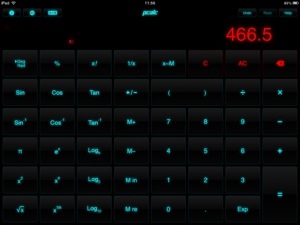
PCalc is ideal for scientists, engineers, students, programmers, or indeed anybody looking for a feature-rich calculator for the iPad, iPhone, or iPod touch.

It includes an extensive set of unit conversions, a paper tape, an RPN mode, engineering and scientific notation, as well as support for hexadecimal, octal and binary calculations.

Based on the popular calculator for the Macintosh, PCalc has been redesigned from the ground up to give the best handheld experience.

Features include:

Switchable button layouts – choose from many different horizontal and vertical layouts to suit your needs.
Calculator themes – pick your look, all the way from minimalist to striking.
An RPN mode with one button access to the stack and optional two, three, or four-line display.
Hexadecimal, octal and binary modes, complete with a variety of bitwise operators.
All the extensive unit conversions, functions, and constants from the desktop PCalc.
Editable user constants which are synced automatically across multiple devices with iCloud.
A simulated paper tape to keep track of your calculations with a “ticker tape” mode.
Multiple undo and redo. Just flick the LCD to the right and left to reveal the past and future.
Stylish, consistent user interface.
Supports copy and paste.
Universal build supports both iPad and iPhone/iPod touch in one.
Support for iOS 6 and Retina display on all devices including the new iPad.
Support for the iPhone 5 and new iPod touch.
20130112-120616.jpg

The 4.7 inch Apple iPhone

Ok, I present you the 4.7 inch iPhone. It’s ultra thin, running iOS 7, the worlds most advanced operating system, available in 128gb memory, 20mp iSight camera and its absolutely beautiful.

20130112-114011.jpg

So once again Apple would be late to the market with a large screened device, but what would you do. Would you ditch whatever you have and buy one. Would you stick to your 4 inch iPhone 5 or similar sized android phone, ditch those crappy windows phones, give up your Samsung Phablets and hail the large iPhone as the best and only device. Anyone on Symbian, please see me for counselling.

You see iOS 7 will feature better sharing and changing of default apps, and the notification centre will get improved, and the home screens will feature dynamically changing icons.

Tempted?

Apple at CES

Hang on a second, I know what you are saying, Apple didn’t attend CES. Well technically it didn’t, but it presence was huge and felt everywhere there.

In fact there were more Apple accessory stands than imaginable. From cases, power adapters, lenses, weird and wonderful app with hardware then could feast the eye.

Just shows you that despite all the high tech coming from other avenues, Apple’s influence is huge. Mind you even one of Samsung’s top executives admitted at home he uses an iPhone , Apple TV, iPad and iMac.