Category Archives: Android

Nintendo digital sales are soaring

Nintendo’s new Wii U has been labeled a flop with estimated sales of only 55,000 units domestically in the month of March. Nintendo of America’s chief executive Reggie Fils-Aime isn’t worried, however. The executive told GamesIndustry.biz that digital downloads are soaring and fast becoming a “notable contributor” to the company’s bottom line, a trend he believes will continue.

“We have 15 Nintendo-published titles available, both physically and digitally [on the 3DS],” he said. “So far in 2013, of those 15 available in this format, 11 percent of sales have come through full digital downloads of those games.”

Nintendo’s 3DS handheld has been a surprise success for the company, selling 8 million units in the U.S. in its first two years of availability. Fils-Aime revealed that the hit 3DS game Fire Emblem alone has seen digital sales of around 80,000 copies.

Nintendo seem bullish of their successes but in reality the smartphone will takeover eventually.

However, Nintendo could cream in money by offering their software on iOS , android and other platforms. The hardware operation would just have to fold.


BBC iPlayer Radio just got a decent update on android

The BBC iPlayer Radio just got a decent update on android. Apart from working on the new screen resolutions, it has also had a facelift.

Features include –

– Take BBC Radio with you wherever you go
– Listen to live radio from all the BBC’s UK radio stations over Wi-Fi and mobile networks
– Quickly switch between stations with a simple radio tuner dial
– See what’s on-air across all stations via the Full Programme Guide
– Listen to on-demand programmes from the past 7 days
– See the currently playing track on music stations
– Find out what music and guests featured in on-demand programmes
– Set an alarm to wake up to your favourite station
– Set alerts for upcoming programmes
– Watch video clips including music sessions
– Find hundreds of BBC Podcasts to listen to
– Browse programmes by Schedule, Category, Featured and Most Popular
– Listen in the background or in standby, with quick access to what’s playing via the notifications panel

Try the Samsung Galaxy S4 first without buying it – new simulator

Samsung has created a simulator for the Samsung Galaxy S4 so that you can try all its new features prior to purchase. Just follow the on screen instructions. Click here

Naturally, this being Samsung, it won’t work on an iPad or iPhone as it needs flash. However, on your PC it is fairly fun to experiment with the various settings. However it is only a simulator and it doesn’t inform you that the memory is low if you have bought a 16gb model.

When is Thin too Thin and Does Size Matter

Size matters. Or does it. Is thicker better than thin. Is a longer length better than a shorter one.

Recently, I have held many different phones, some thin, some thick, some long, some not so long and some massive. And the most comfortable and reassuring phone to hold was the Nokia Lumia 620.

The 620 beat the iPhone 5, Samsung S4, S3, Note 2 and HTC One. And yet it is the thickness and for its size possibly the heaviest that gives it this result. Surely this can’t make sense.

Lets look at each of the devices in turn.

The Nokia Lumia 620 just fits in the palm of your hand. It’s weight feels assured and your would have no chance of letting it slip.

The iPhone 5 is just too light. If it had been made thicker, then battery life could have been increased. As it has more angular sides it is not as comfy to hold as the 620 with curved sides.

The S3, S4 and HTC One all should have been made thicker to incorporate a bigger battery too.

The Note 2 has a big battery for a longer usage time. Except its too big for general use.

But then we sometimes opt for a bigger screen to provide a better media experience.

What’s your ideal sized phone and why?

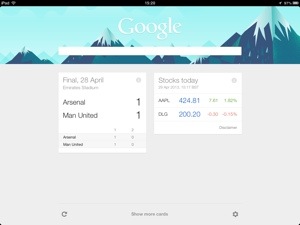
Google Now is live on iOS – but….

Google have updated its iOS app, Google Search to include Google Now functionality. It looks great, works as it should but is missing the full monty provided on android devices.

Firstly, its an app and not built into the core operating system. That means that unless you open the app you won’t receive any Google Now cards. Pointless really.

Maybe Google could have added notifications for the cards, but this has not been provided. There is of course the big question, would Apple have permitted such functionality. But an even bigger question, would Google want the full effect working on iOS. By giving iOS users a taste of its wow factor, it will tempt people to at least look at an android phone, maybe even buy one.

Just a little warning, once Google Now is activated location services remain running even after you exit the app. This will have an impact on your battery life.

I suppose in the end, something is better than nothing.

20130429-164817.jpg

HTC One – Zoe Tips

First, open the camera app, turn Zoe on and capture your photo.

With a Zoe, you can find the best image. Each Zoe contains about 20 individual images which you can review to find the best photo. It’s an easy way to make sure you capture the best image possible. Simply stop the Zoe playback by tapping the screen and then use the slider bar at the bottom to review each individual frame. Once you find the image you want to keep, select “Save frame’ from the tools menu.

If you’re in an active setting, such as jet skiing, swimming or running, capture the moment in Zoe mode again. You’ll have a 3 second clip and 20 still photos. Create a sequence shot by going to Edit > Retouch > Sequence Shot and selecting the frames you want to use to create an amazing composite in a single photo. Best filming with the motion moving either left to right or right to left in front of you.

In Zoe mode, use the three second Zoe to start with the wide landscape shot of a field full of flowers ending on the tight shot of that one flower right in front of you. This will give someone viewing your Zoe the full experience without missing a single detail. Quite effective this method.

Filming using Zoe mode, use a little movement. Just a small amount can significantly enhance the shot while showing the environment you or your subjects are in. Begin the motion before hitting the shutter to start the Zoe capture, then when you share the highlight video there’s seamless transition from one clip to the next.

And finally use a tripod if you can.

HTC One vs Samsung Galaxy S4 – ram

The HTC One and Samsung Galaxy S4 are two of the latest and greatest phones to hit the market. They both come with 2gb ram to ensure a smooth operation.

However, there is a startling difference between the memory requirements of these devices. On the HTC One, there is no app or setting that is installed to show you how much ram is left to use after the phone has used what it needs. On the S4 there is a task manager that does show the free ram available. And it’s not surprising why the HTC One omits this information. Read on.

So the HTC One has 1.5gb free from the provided 2gb.

The Samsung Galaxy S4 has 0.8gb or 800mb free from the provided 2gb.

So guess which phone is having users comment on phone lag, freezes, camera lag and stutters.

Yep, the Samsung Galaxy S4. It is simply overloaded with too many features, and touchwiz is a huge memory hog. The HTC One has nearly double the free ram available providing a fast, lag and stutter free experience, and hence can safely omit memory ram usage.