iTV Player on android is now available for everyone on android as Samsung’s 3 month exclusive is over. It has also had a lot of bugs fixed.
Category Archives: Android
Samsung UK offering the Galaxy Note 3 and Galaxy Gear for pre order – and the price?
Samsung UK has offered the Note 3 and Galaxy Gear for sale.

And the cost? Note 3 is £649 and Galaxy Gear £299. Or buy both for £848. And then you need to add £40 plus for a Samsung case for the Note 3. The S Cover Qi case is £55. Ouch!
So what do you think?
My top photography apps on android
Those that follow my twitter account @gavinfabiani know that I like posting photos of my pets and Dartmoor. Consequently, I also have tried a number of photography apps. Below are my favourite-
1. The default camera app that came with your phone. Always start here and see what it can and can’t do.
2. The phone’s default editing options. Explore what your phone can and can’t do. Examine file sizes after editing too as some photo editors shrink the photo.
3. Camera Zoom FX – simple easy to use and tons of editing options. Works on tablets too. Complete control of photo capture. Voice activation.
4. Color Splash Effect – takes an image and makes it black and white. Then add back colour to the areas you want. Plus add text, effects, overlays, frames, and textures too.
5. Picsay Pro – similar to Camera Zoom FX but only for editing photos. Has some snazzy effects too.
6. ProCapture – camera + panorama – high quality panoramic photos up to 12 linked together, wide shot, loads of camera options. Good on tablets too. No post editing just great at taking photos.
7. Pro HDR Camera – full control over taking HDR photos. Plus after editing adjustments before saving.
8. Photoshop Touch – enables layers and other pro editing options. If you know what you are doing this is a very good app.
9. Lapse it – Time Lapse – Pro – create some stunning time lapse effects. A tripod might be handy.
10. Snapspeed – another post editing app. Drama is a great affect to use. Makes boring photos exciting.
A lot of the apps have some overlap, but each offer something special. With all the above and the default camera app you will be surprised by what you can achieve.
The Reviews on Gavin’s Gadgets
Below are the links to all the articles / reviews written on each of the devices.
Happy reading.
Samsung Galaxy Note N7000 revisited
Audio Technica ATH-AD900x Headphone review
Olloclip 3 in 1 Lens review for iPhone 5
Samsung GALAXY Note 3 + Gear : Official First Hands-on
Samsung has just released a huge 18 minute long video of the Note 3 and Galaxy Gear Watch.
Despite the high cost of these products I am certain Samsung will sell loads.
I must admit it does look so tempting.
Microsoft wins another patent battle against Google’s Motorola
Microsoft’s won another key courtroom victory in its landmark patent case against Google’s Motorola Mobility division.
A federal jury in Seattle late Wednesday found that Motorola failed to license its standard essential patents related to the H.264 video standard and the 802.11 wireless standard on FRAND (fair, reasonable and nondiscriminatory) terms in breach of its industry obligation to do so. And it awarded Microsoft about $14.5 million in damages for Motorola’s misstep.
The ruling from the first stage of the case, which found that Microsoft should pay only $1.8 million a year in licensing fees for the patents Motorola was demanding $4 billion for, it’s a precedent-setting victory and embarrassing to Google.
Clearly, the patent value Google thought it was buying from Motorola was not as strong as it first thought. Microsoft seems to be doing really well from licensing agreements over patents with many android phone manufacturers.
Removing your apps from showing on Google Play
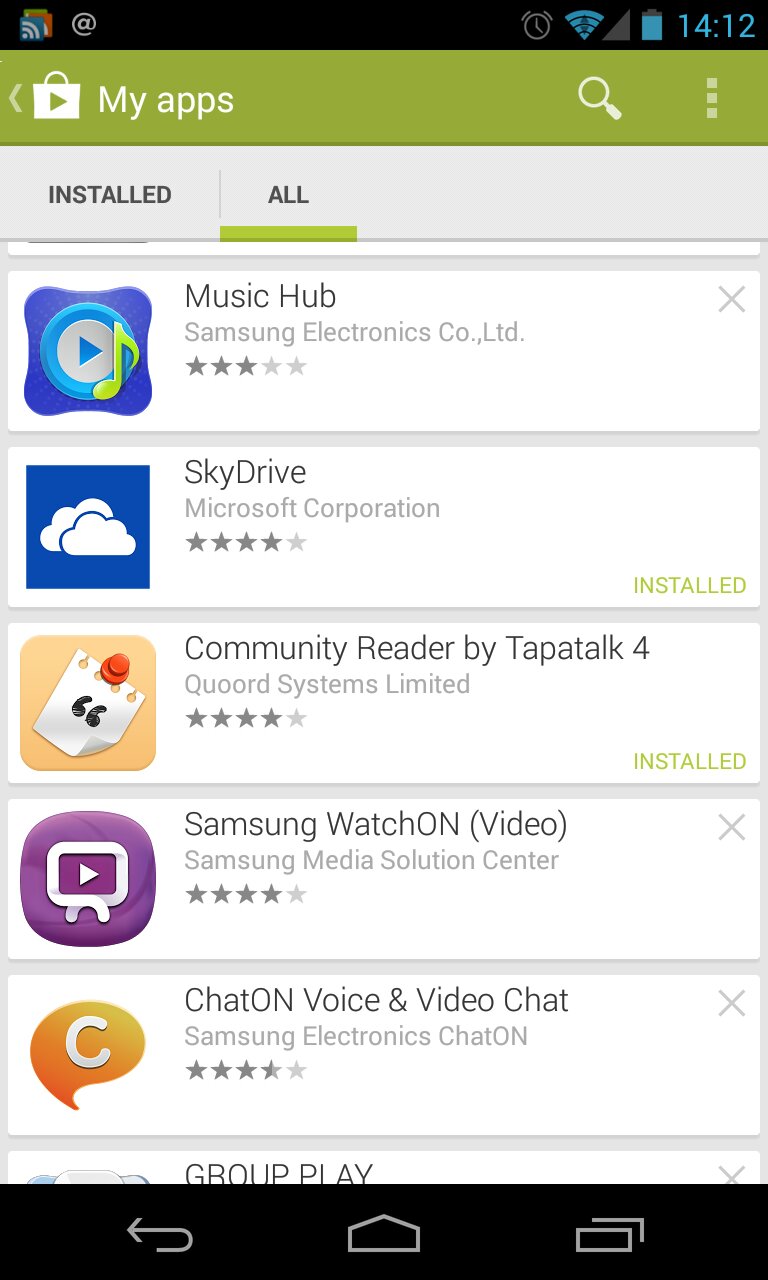
Over the years I have installed over a thousand android apps. Sometimes, I installed the free version and then bought the full app. Or I tried various free apps until I got what I needed. Or in the early days, I downloaded an app to fix or provide a function.
But I was getting up scrolling through unwanted apps and games. Well, in case you haven’t noticed, fire up Google Play on your phone or tablet. Select my apps, all. Now top right on each app listing is a cross. Carefully, tap the cross. A box will pop up and ask would you like to remove this from your list. Hit yes and its gone.
But what if you have a large number to remove. Push down on the app icon and hold for a second. It will highlight the line and on the top bar the selection dialogue appears.

Now tap on the app icons of all the apps and games you want to remove. Then on the top selection bar, tap delete and voila.
I removed about 650 unwanted apps or games.
Apple already has a Galaxy Gear contender from 2010
TUAW has an excellent post on why Apple has already beaten the Samsung Gear.

PayPal just got a huge update
https://play.google.com/store/apps/details?id=com.paypal.android.p2pmobile
You can now pay smarter, simpler and anywhere at favourite restaurants, stores and more using the new digital wallet. This is for android and iOS devices only.
Not seen this anywhere yet but I’m sure it will accelerate in adoption soon.
Would you use your phone to pay for goods or services ?
Samsung Galaxy Gear – Samsung’s new wearable tech

Samsung has just announced the Galaxy Gear, a trendy watch apparently with a 320 x 320-pixel, 1.63-inch AMOLED touchscreen,a built in speaker in the watch strap including and a pair of mics for recording and playing back video content and communicating with a caller via the built-in dialler, which also works with the native phone app in your connected Galaxy device.
The Gear includes an 800MHz processor, a 315mAh battery, a BSI camera sensor and autofocus lens mounted in the wrist strap that’s tasked with capturing 1.9-megapixel stills and 10-second video clips at 720p, 640 x 640 or VGA resolution with sound. That camera, designed for on-the-go captures where convenience, not image quality, is a priority, is paired with a pre-installed app called Memographer. Other apps for the Galaxy Gear are set to be made available around and just after launch.
My favourite strap line from the presentation was “Just point your wrist, and shoot”. Sounds like the Secret Service or something out of James Bond.
Now the watch has a 25 hour battery and costs nearly £200. For both those reasons its off my wish list.
And who wears a watch nowadays. If you want to know the time you check your mobile!

