Category Archives: Android

The LG G2 Impressions

I have spent a few days with the LG G2. The specifications are readily available on the web, so I am just going to cover off my lasting impressions of this phone.

First the negative. The model I had was a 16gb version which in my books does not provide enough memory if you are going to want to store your music, apps and games on it. My theory is networks in the UK did not want to stock the 32gb version so they could force you on to using a larger data tariff.

Now the positive. It feels great to hold in the hand. The rear buttons are weird but you do get used to them. The screen is simply the best I have ever seen. It embarrasses my iPhone 5S screen. 5.2 inches of gorgeous screen and hardly any bezels. In fact the screen is the one aspect of this device I will really miss.

The camera was fairly good, but the freak UK weather meant photographing in 100mph winds was not possible.

Double tap to turn on or off is excellent. It also works when in other apps, if you tap on the status bar instead.

Battery seemed capable of getting me through the day despite me using it constantly.

Overall, it was the screen with its gorgeous display and tiny bezels that stand out. Now if the new Nexus 5 is based on this, but with a 8mp OIS camera, we really are in for a treat.

LG announces the curved self healing G Flex Phone

w640

LG has announced its curved-screen smartphone, the G Flex. The phone uses flexible OLED screen technology to allow for a dramatic curve on the horizontal axis, is between 7.9 and 8.7mm thick at various points, weighs 177g, and has a 6-inch 720p display. Inside there’s a 2.26GHz quad-core Snapdragon 800 processor, 2GB of RAM, a 13-megapixel camera, and a 3,500 mAh battery.

It has a special protective film on the back cover is designed to get rid of scratches on the phone within minutes. Seeing is believing.

I am so not convinced by this curved phone and at 6 inches in size it is huge. And a self healing back sounds like fairy tale stuff. I suppose seeing is believing. What do you think?

Catch up on 20 of the Latest Phone/Gadget Reviews

It is often difficult to find the reviews of devices and accessories I have written about, so below is a quick way to find all the articles for the key reviews. Or use the top right search box to search for anything on my blog.

Netatmo Urban Weather Station Review

Sony XBA-H1 Headphone Review

Sony Xperia Z1 Review

Sony QX10/QX100 lens review

ZTE Open Review – Firefox OS

Huawei Ascend P6 Review

Nokia Lumia 925 review

HTC One

Samsung Galaxy S4 Zoom Review

Sony Xperia Z Tablet

Samsung Note 2 review

Nokia Lumia 620

Audio Technica ATH-AD900x Headphone review

Fiio E12 Headphone Amplifier

Olloclip 3 in 1 Lens review for iPhone 5

Trident iPhone 5 case review

Bluetooth iPad Mini case review

Glif+ for iPhone 5 review

USB Fridge Review

USB Rollup Drum Kit

Samsung Galaxy S4 sales figures – good or bad?

Samsung’s Board of Directors might be somewhat dissatisfied with the S4’s sales figures, but selling 10m in the first month and then another 30m in the next 5 months is rather impressive.

It also goes to show that competition has increased from all areas. Nokia/Microsoft is increasing its revenues. Apple is pulling punches with its iPhones. Huawei is coming up strong and threats from other entrants too.

It also just goes to show that the majority of people can manage with 9gb of internal storage.

Samsung looking to prevent customers using third party accessories

Sammobile reported that Samsung is looking to restrict its customers using third party batteries and cables with its phones by incorporating a ID chip.

This means third party companies will have to obtain authorisation and the necessary equipment from Samsung in order to be able to sell accessories.

This might seem draconian but it is similar to what Apple does with it’s lightning connector.

Netatmo Urban Weather Station for iOS, android and Windows Phone

I have written 2 previous articles on this weather station. Click here to recap https://gavinsgadgets.wordpress.com/?s=netatmo&submit=Search

After owning the Netatmo Urban Weather Station for over a week now, I am writing my full review. Before I start I will just say this is one of those products that does exactly what it says on the tin. If you look back at the previous two articles you will see screen shots of the functionality from the iOS app, web app, WeatherPro and baratmo mac app. Below is the indoor sensor.

IMG_1110

Rear of indoor sensor. Outdoor sensor looks identical, except one inch shorter.
IMG_1111

It comes in a box with two sensors, the indoor sensor is taller than the outdoor one by about an inch. You also get a micro usb cable, UK plug, startup guide/installation of sensors, a screw and raw plug, strap for indoor sensor and that is it. Oh, there was also 4 AAA batteries. I downloaded the app, created a user ID and password, after which then took me into the setup. So all you do, is install the 4 batteries into the base of the outdoor sensor, drill a hole in to an outside wall, where the sensor wont be exposed to direct sunlight and rain, screw the screw into the raw plug and then slide outdoor sensor onto the screw. 5 mins after completing that task, I then connected the indoor sensor to the mains. I then continued to follow the iOS app instructions for setup. At each turn you get a pretty picture of what to do and written instructions. Really, really simple and clear instructions. You next connect your phone directly to the indoor sensor and it updates the sensors firmware, reads your wifi setup and copies it across. The indoor sensor then talks to the outdoor sensor and voila. The screenshots below give you a clear idea of what data you can obtain but this includes indoor and outdoor temperatures, CO2 indoor, humidity, air quality (via CiteAir), mbar, sound levels, weather forecasts (provided by MeteoGroup), graphs plotting data over a given period and more. As an example the rain mode gives you: the amount of rain per 3 hour period (represented by blue bars) and the probability of rain (represented as a red curve). By touching on the icon button on the air quality gauge, you may switch between background air pollution index,
traffic air pollution index and complementary information about the main pollutant.

Screenshot from iOS app which will look the same for android. The Windows Phone app takes on the tile look of Windows Phone.
IMG_1090

This displays details of the indoor and outdoor sensors. Buy scrolling down or flicking up you can reveal more data.
IMG_1091

You can also go in to the settings and retrieve information on the sensors and their battery and wifi strengths. Turning the phone horizontal will allow you to show graphs on all the different measurements. Pinch and zooming allows for the data to be expanded or shortened depending on your requirements. The web app is excellent and shows nearly everything across one page.
20131014-195628.jpg
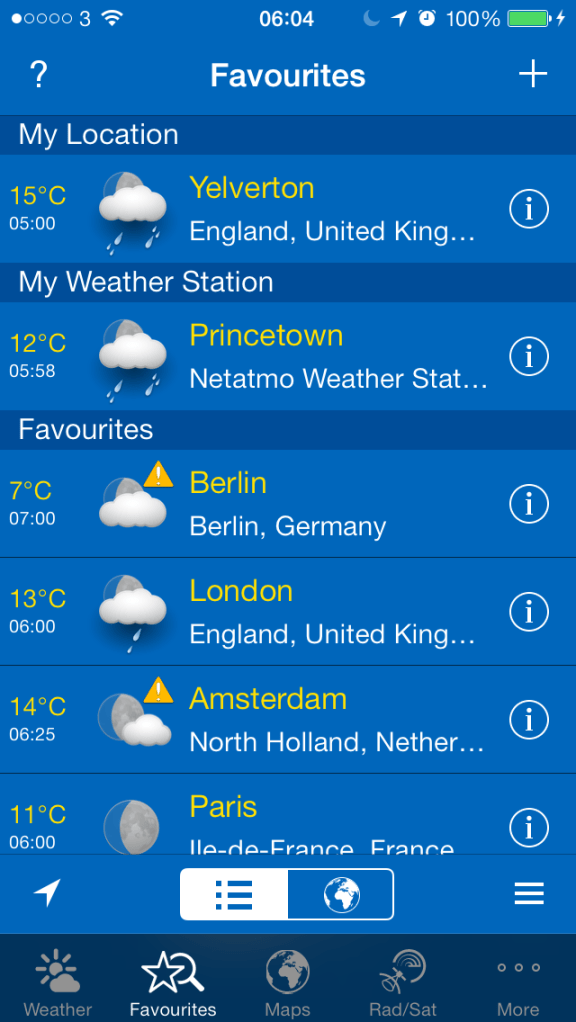
It is great that you can integrate the Netatmo Urban Weather station into other apps. So far I have found WeatherPro on iOS and Baratmo for mac. Screenshots below.
IMG_1092
IMG_1093
and for the mac, Baratmo provides a quick list of data from the status bar.
bar

The key aspect of this solution is that it all has to be linked to your home network via wifi and logged in to Netatmo servers. You need 4 AAA batteries in the outdoor sensor which requires installation on a wall, preferably not in direct sunlight and directly exposed to rain. i.e.. perhaps under the eaves. And apparently the batteries last one month, but at present I cannot provide confirmation of that as I have not had the product long enough. A caution, if Netatmo’s servers go down, you will not get any data.I have had this a week, and for 2 hours last Wednesday they were updating their servers so I received no data.

The sensors send data every 5 mins, can provide notifications for high levels of CO2 or weather warnings from sensors, you can manually check for a CO2 reading immediately update by pushing the top of the indoor sensor. When measuring on demand, the indoor module displays the CO2 level using the following color code:
– Green = Good
– Yellow = Could be improved
– Red = Room should be ventilated.

You can also invite friends into the Urban Weather Station to share you data too. You can also act as a contributor for your outdoor readings. This is still a work in progress, but this is a map of what people would see.
map

All in all it is an impressive experience, albeit expensive at £139. Additional indoor sensors, up to another 3 can be added to the system too. There is also a PDF manual that you can download which is seriously comprehensive.

So far I have really enjoyed using the Urban Weather Station, and is probably my favourite gadget of the year.

Update – after a week, the following notifications appeared.

20131019-171413.jpg

Update 2 – last night mapatmo tweeted me and invited me to be part of the Public World Netatmo World Map. More details here – http://www.mapatmo.com

How have your phone habits changed?

If I look back at my years in gadgets and tech, I had a crazy variety of tech and gadgets.

The tech of 10 years ago was buggy, but at the same time great to tweak and try to get it to do things it wasn’t meant to.

I used to think nothing of flashing a custom firmware on my HTC HD2 or future android devices. Sometimes several times a week. All in the pursuit of the latest and greatest performance. I even jail broke my iPhone 5 to get the bespoke custom tweaks on but reverted back after it crashed more often.

Move forward to 2013. Google is releasing android 4.4 and Apple has released iOS 7. Both are mature operating systems. And both offer a superb user experience. Which is good since now I just want my phone to work. I don’t except that if I spend £500 on a phone, even if it’s free on a contract, that it is acceptable to have a buggy phone that has many faults. I don’t want to start spending hours replacing software included by the manufacturers. I just want and now expect it too work. I also expect timely updates to fix any small issues. And I expect good after sales support.

So have you found your phone habits changing ? If so, how have they changed?