All posts by Gavin Fabiani-Laymond

Unknown's avatar

About Gavin Fabiani-Laymond

President, CEO & Editor of https://gavinsgadgets.com Reviews & News of Technology

iPhone 5 “No Service” fault update

As you all know I was at the Apple store yesterday with an appointment with a Genius.

My iPhone 5 has suffered constant No Service issues whereby once it lost the signal it never reappeared.

Well after a period of 10 mins I walked out of the Apple store with a replacement iPhone 5. Over 24 hours later I can report not having suffered any No Service problems.

So it seems I had a faulty handset. The difference now is so much better. I’m still keeping my fingers crossed.

The iPod Classic – R.I.P. not quite

We live in the age of mp3 downloads and the Cloud. Google, Amazon and Apple all have music cloud solutions. And you can buy your music from any of the above, and never download a song. All you need to do is stream your collection over the Internet.

Sounds amazing doesn’t it. No need to use a bookcase or a cabinet to display or store your CDs. No need to rip and then sync across to your devices. So surely the iPod Classic reign is over.

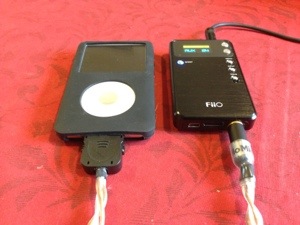
Well, it may be in a few years, but it’s actually a hidden gem. With a storage of 160gb it has a huge capacity for holding your music. I have my entire music collection stored on it. It also sits in the cloud via Google Music by the way. With the Classic you don’t need to pay for unlimited Internet or increase your broadband capacity. You have a small pocketable device that you can plug and play. Simple. If you Cloud service goes offline you are screwed. Not with the Classic. But that’s the only start of what you can do with it. You can use it as your home music system by connecting to a dock, and because it still uses the old 30 pin connector, you have portable audio solutions. Using the 30 pin connector, you can bypass the iPod’s built in headphone amplifier and connect it to a dedicated headphone amp as shown in the photo below.

20121225-103200.jpg

This enables a better audio experience. Mind you the iPod Classic is known to possess a decent default sound signature.

So with all the usefulness of the iPod Classic, it’s huge hard drive and its always available without the Internet, it still has a number of years left.

List of over 50 Android Apps on Sale

Looking through the list of apps for sale on android, the below were found.

90Droid Extreme Fitness Tracker
A Charlie Brown Christmas
AccWeather Platinum
Animaonline SNES Emulator
APK Backup
ATC Assistant
BackStab
Bataria Pro – Battery Save
Beautiful Widgets
Brainwave Tuner
Card Camera
Clipper Plus
Coach’s Eye
Creator Studio Mobile
Dropsync Pro Key
Dungeon Raid
ezPDF Reader PDF
Farm 123
Fieldrunners HD
Foodster
Gangster Rio: City of Saints
GPS Status Pro – key
Grimm’s Snow White
HD Widgets
How the Grinch Stole Christmas
IM+ Pro
Jamie’s 20 Minute Meals
Jump Desktop (RDP & VNC)
Kids ABC Letters
Kids ABC Phonics
Kids Animals (children 3-9)
Kids Colors
Kids Connect the Dots
Kids Learn to Read (Preschool)
Kids Numbers and Math
Kids Precschool Puzzle
Memory Booster (Full Version)
Modern Combat 2: Black Pegasus
Modern Combat 3: Fallen Nation
My Backup Pro
My Diet Coach Pro
NRG Player Unlocker
N.O.V.A. 2 – Near Orbit
N.O.V.A. 3 – Near Orbit
OfficeSuite Pro 6
Order & Chaos Online
Photaf Panorama Pro
PopOut! Night Before Christmas
ProPanorama
ProCapture – camera + panorama
Root Call Blocker Pro
ROM Toolbox Pro
Rotten Friends Pro
Screenshot ER
Sign Language Dictionary!
Sketchbook Mobile
SlideIT Keyboard
Sneaker Player
Sound Sleep Deluxe Edition(MT)
Splashtop Remote Desktop
SwiftKey 3 Keyboard
SwiftKey 3 Tablet Keyboard
Tarot of Marseille
The Amazing Spider-Man
The Dark Knight Rises
Thumb Keyboard
V1 Gold Premium Unlocker
Where’s My Water?

iTunes 11 – Paint Dries Quicker

Somehow WordPress deleted or overwrote this post after it got posted, so having to rewrite it.

Back to the post ….

iTunes 11 got released last month, and while it takes a little getting used to its new layout and options, overall I actually like it.

However, I received my replacement iPhone 5, and decided to do a fresh install. And after selecting 400 apps for install and then set the sync in motion, I decided to start selecting the albums to sync across. Well that was the plan. Unfortunately it seems that as each app installs it is impossible to select albums as you keep getting the round ball of thought, that is the pc seems to slow right down and freeze, and as a consequence you can’t select your music.

What I don’t understand , is that iTunes 10 didn’t have this problem. Clearly an update is needed.

Track Santa on your iPhone

In this modern world of technology not many people know that Santa has a GPS enabled smartphone. Luckily for all the kids out there he uses Google Maps as well, and not Apple Maps for those midnight chimney deliveries.

That means, if you want to follow Santa, and know where your presents are, download and install Google Earth via the Apple AppStore, open the app, swipe up from the bottom, open the tour tab, tap the Santa button and watch Santa go!

Oh, and Santa, a Samsung Galaxy Note 2 would be lovely thanks.

It’s War – Amazon & Google on a Collision Course in 2013

Reuters is reporting today that it is expecting 2013 to be war between Google and Amazon.

Amazon CEO Jeff Bezos got word of a project to scan and digitise product catalogues by Google a decade ago, and the seeds of a rivalry were planted. Bezos was an early investor in Google but he now realised Google had other plans and could encroach upon his online retail experience.

Move forward to 2013 and with both companies spanning online advertising, and retail to mobile gadgets and cloud computing, the big clash is about to happen. It could mark the end of any Google cooperation. Interesting times ahead.

Three UK Sim Only Deals – How to Get an Even Better Deal

Today, I was in Exeter sorting out my iPhone 5 issue with the Apple Store.

Afterwards, I went to the 3 store to look at renewing my 12 month sim only deal. In fact, both my wife and I needed new deals. Originally we have been on a £10 per month deal, whereby we both got 1gb of data, 2000 3 to 3 calls, 300 voice mins and several thousand texts, which we hardly ever used due to iMessage.

During the course of this year, we discovered that my wife didn’t need 1gb of data, 500mb was more than ample, and I needed more than 1gb of data. 3 have 2 plans that seemed ideal for us. The Essential Sim 200 – 12 month – this is £6.90 per month, 500mb of data, 200 mins, 5000 texts which would suite my wife. I opted for the Ultimate Sim 600 – 12 month which is £15.90 per month, 600 voice minutes, 5000 texts and All You Can Eat Data.

However, the store have the option of including free 3 to 3 calls, which we both got.

But did you know it is possible to save even more money off those deals. I had the option of having a new number, and by doing the two deals together, the second sim gets a friends discount applied, reducing the £15.90 to £12.90, saving £36 a year.

That’s a good deal, don’t you think.

The Genius Appointment at the Apple Store on Xmas Eve

As a number of you would have read I have experienced a number of issues with my iPhone 5. The 2 specific issues were poor battery life and No Service.

After updating my iPhone 5 to iOS 6.0.2 the battery woes seemed to have improved a lot but the No Service issue seemed fixed at first, but then came to rear its ugly head.

So at 9am on Xmas Eve I met with a Genius at the Apple Store, Exeter. I explained I had an open case number, all the actions taken already and the current issue. Less than 10 minutes, later I had been given a new iPhone 5. That is seriously incredible service. I do not know of any company that offers such a brilliant after sales service. The Genius also asked if I needed any help re-setting up my iPhone.

Apple products may carry a premium, but they do offer the best customer service. Period. Technology can be temperamental and difficult to understand. But Apple make it simple, reliable and also offer in store training, on a group or one to one basis, and as a customer what more can you ask for.

As to the poor staff working on Xmas Eve, it seemed they were going to be rushed off their feet all day until closing at 5.30pm.

Meanwhile, I am at home, having a leisurely lunch.

Merry Xmas.

Apps in the Cloud – The Dangers

If we look at the two main operating systems Google and Apple, they operate a model whereby your apps are stored in the cloud for you.

Google is totally setup this way, meaning that it’s not possible to have a local copy on your pc. Apple uses iTunes to store a copy on your pc but also offers it stored in the cloud. With iPhones now you can select not to use a pc and just work using the cloud.

With my android and Apple devices I have encountered situations whereby the app I want to download doesn’t exist anymore. Fortunately with my iPhone I waa able still sync to iTunes on a pc so I was able to reinstall a particular app not available any more. I wasn’t so lucky with my android phone. I would have also been in trouble if I had just synced my iPhone in the cloud. As once the app disappears from the respective app stores, that’s it.

Maybe the cloud storage needs better backups. Also what happens if the cloud gets hacked and your music is deleted?