The Apple iPhone 6S Plus comes with a reasonable camera capable of consistent and reliable shots time after time. But what if you want to do more with the camera. Thankfully, the A9 processor is extremely powerful which means with the right third party app you can create photos that push the camera to its limits.
For this post I have used to apps. ProCamera+ and Nightcap Pro. These are apps I use all the time and have purchased from the Apple App Store. None of the photos below have been post processed or edited with any filters or any app. These are exactly what the respective apps produced. If you want to view the full size version, just click on the photo.
First up is a shot of Exeter High Street using ProCamera+ in HDR Auto 5 (5 bracketed photos). Just look how dramatic all the colours are in this photo.

Another shot using the ProCamera+ app in HDR Auto 5. This is Exeter Castle and Northenhay Gardens in Exeter.

Still using ProCamera+ app in HDR Auto 5. Exeter Cathedral Yard. Again fantastic colours.

Same as above for the next 2 shots. Some historic buildings in Exeter.


From what I can see, ProCamera+ works better with buildings than landscapes of fields, trees and plants.
Next up, ProCamera+ low light mode of Postbridge Bridge.

Now using Nightcap Pro long exposure mode. This was a long exposure of 30 seconds.

ProCamera+ Auto 5 HDR in Black/White HDR.

Now I realised after taking the above shots, that ProCamera+ had JPEG quality at 85% and not 100%. It also has the option of saving photos in raw format. Nightcap Pro has this option too. So with all the next shots in raw lets see what we can do.
Nightcap Pro – 30 second exposure in Long Exposure mode. Tripod used.

Now with ProCamera+ Low light mode. Tripod used.

And now with ProCamera+ Low Light HDR mode. Tripod used again.

Vast difference here.
Also remember with all the church shots it was near total darkness.
Nightcap Pro also is really excellent for photographing light trails, stars and the Space Station. It actually has specific modes for these items! Below is a quick shot with Nightcap Pro demonstrating light trails.
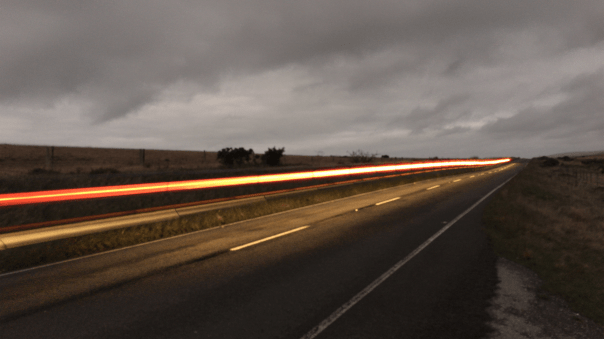
So there you have it. With the help of alternative apps you can easily push the boundaries of the Apple iPhone 6S Plus camera.
 Gavin's Gadgets & Photography
Sorry I have missed your blogs on photo apps this past few days Gavin, health and all that….
Excellent use and comparison between the two apps and their respective areas of use.
Both apps are worthy of a purchase and if anyone is in any way curious on smartphone photography, apps such as these definitely require investigation.
LikeLike
Hmm, torn between the colours and slightly softer details of the exeter 5 shot hdr photos. At quarter resolution they look pretty good. Vivid colours everywhere. How realistic I can’t tell but nice to look at 🙂
Something is off though with a certain shade of red that gets blown out. Eg the bonnet of the window shopper to the right in the first shot. Is there a way to drop ev a little in the app ? Red is a tricky colour to get at the best of times and is easily blown.
The surprising thing about the 30s nightcap photo of the bridge is why it isn’t blown out. It’s like you have an ND filter on. The water flowing below looks smooth. The monochrome hdr looks like a high quality pencil sketch. Like it the best.
Onto the church and I’m trying to figure out how much light these apps can squeeze out of the iPhone and map that to what the g4 did.
Nightcap pro and lowlight pro camera are close to 4s.
The 64 shot is closer to 8 s.
If the iPhone maxes out at 1s that’s almost three stops added.
Both these apps have their fortes in certain areas.
Nice one.
LikeLike
Yes you can drop the EV. I also realised that the Exeter shots on ProCamera had jpeg quality at 85%. Grrr. You can move it to 100%. And also Tiff or Tiff Lossless. There are other tweaks you can make too on these modes. Clever stuff really. I agree both apps have their fortes hence why I use both.
LikeLiked by 1 person
Not bothered about the 85% I put it down to 5 shot hdr. All going to 100% does is baloon the file sizes. Somewhere around 92% is optimal.
LikeLiked by 1 person
I will have to go back at night and see what these apps can do with the church. Just been raining too much lately.
LikeLike
There is more processing done in the 64 shot photo compared to the stock g4. The histograms suggest a better exposure than the g4. Better separation of darks and midtones.
This better exposure via histogram is something I notice in general from the iPhone even with the stock camera. A little extra tweaking done by the software.
LikeLike
Wow, these are jaw dropping pictures and from a phone too!!!! I’ll be getting the apps, thanks for sharing
LikeLiked by 1 person
Very interesting. If you or your readers know of good Android apps, I’d love to hear about them. (There are so many and I hesitate to waste time if someone already has. 🙂
LikeLike
Hi Rob. I have tried many of the android apps. Sadly the value of these apps depend a lot of the android phone. Some work better on one android phone than another.
LikeLiked by 1 person
Ah, yes, of course. So many variations on capabilities. My Nexus 6 has OIS, f/2.0, 4K video, and some limit to the ISO, but also has other specs that I don’t know about. I suppose that is why each phone app says things may or may not work depending on your phone specs, not to mention the SDK as well.
LikeLike