Below is a review I wrote in November 2004. This gadget caused a storm wherever I used it. It was a cool piece of kit, and was available 8 years ago!
The Virtual Keyboard
Now before anyone asks, is this fantasy or fiction I will state this is fiction and following my use of the keyboard it is no gimmick.
In fact before I continue, I have been left stunned at how well its works. Not to mention the “wow” factor. All my colleagues, friends in the pub, new friends I have made showing the Virtual Keyboard cannot believe what they are seeing. However, they are equally amused by the fact it actually works.
So what do you get in the box.

The Virtual Keyboard, comes with a lovely small case for it, some instructions, the installation CD, and a whole host of adapters which connect to Palm, Pocket PC, Smartphones and even a PC (serial).
The Virtual Keyboard uses the latest infrared and laser technology to project a full size qwerty keyboard onto any flat surface.
The current version is compatible with:
O2 XDA I and II – O/S Pocket PC2002/3
Orange SPV e200 – O/S Smartphone 2003
Palm Tungsten T3 – O/S Palm OS 5.x
Palm M505 – O/S Palm OS 4.x
HP2210 – O/S Pocket PC2003
HP5550 – O/S Pocket PC2003
Laptops/Desktops – O/S WinXP, 2000, NT & 98
The actual device is quite compact. In fact it was a lot smaller than I had anticipated.
Loading the installation CD revealed all the different operating systems. I chose Palm OS5 and installed the driver.
Plug the charging into the wall and give the unit a 2 hours charge. This should last for 2 hours continuous typing. So in reality you should get a whole days worth of typing if you do a bit here and there.
Next it is important to configure the driver to your own typing style and the various options as shown below.
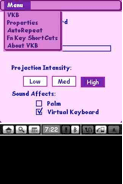


Also when connected the driver provides a useful meter for the battery level.
In addition there are a range of keyboard shortcuts which make life a little easier. So what does it look like in use.

The size of projection is reasonable and easy to use.

It is worth noting that the Virtual Keyboard cannot be used in direct sunlight and must be used on a flat surface. Also, the keyboard driver settings appear to be lost following a soft reset.
Definitely recommended and a very cool piece of kit.
So would you have been tempted?
 Gavin's Gadgets & Photography
Oh, yeah, I remember that tonkle. Never got to use it and questioned its worth. But nowadays, it’s no worse than typing on glass as we all do with our phones and tablets. But given our typing on glass, it’s rather irrelevant now.
LikeLike