Moga are well known for their android compatible game controllers. They have now brought out an official Apple approved and certified game controller for your iPhone 5C, 5, 5S and the latest generation of iPod Touch. It only works if you have iOS 7 installed as this has the new native game controller APIs installed.
Scroll back a few articles to see my current list of games supported by the game controller. Also note, that it seems the list is growing very fast on a daily basis. Or to see all my articles on the Moga Ace Power click here. So what does the controller look like.
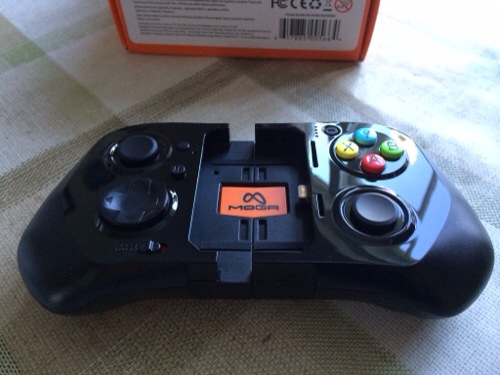
Here it is in its locked closed position. It then expands to fit safely and securely the Apple device. Shown below is the iPhone 5S.
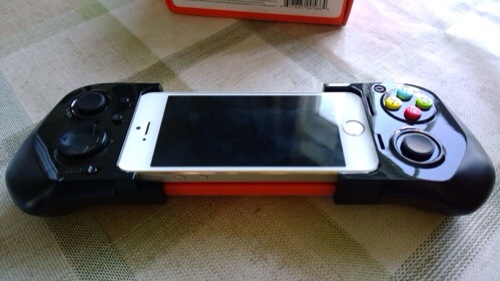
In the box is the controller, instructions, USB micro lead for charging it, and orange plastic inserts. By default the black plastic inserts are installed. This is for the 5S. If you have a 5C you need to remove all the inserts. If you have an iPod Touch you need to use the orange inserts which raise the iPod to be level with the lightning connector. So how does it all work. Well, you first charge the controller, insert your iPhone and lock the slider using the switch under the controller. And that is it since iOS 7 has game controller built in to the operating system, there is zero configuration needed. There is a front sliding switch to allow the Moga to charge your device. This obviously depletes the controllers battery but when it reaches 25% charge it won’t charge the iPhone any more. The Moga has a 1800mah battery. I haven’t been able to obtain conclusive battery life tests but will update this article in due course. The Moga features pressure sensitive and analog controls. In fact, if you use a PS3 controller or similar, you will be right at home with this. In addition there is a battery level button to reveal how much power is left in the controller. There is also a pause and lock button switch. As it uses the lightning connector, the sound is carried through via this method, which means and the right side of the controller is a headphone jack. You cannot use the headphone jack of the iPhone or camera as both are covered.
So the burning question. What is it really like. Well, if you read the reviews published already they only give the controller an average score and at first I was agreeing with that too. However, it was clear these reviewers didn’t spend much time with the controller, as after using it longer I realised it was better than my original thoughts. The Moga Ace Power does feel cheap plastic compared to its android Moga offerings. I have realised part of this feel is due to the sliding mechanism which makes it feel flimsier. Regardless it still gives the wrong impression in terms of quality and this is slightly disappointing especially as this cost £90. In reality, it works and so far exhibits no hardware failings. Once your iPhone or iPod is clamped in position, the whole controller becomes a solid piece and feels rather reassuring. In fact, the longer I have had the Moga the more I have grown to like its design. The list of the iOS games compatible with game controllers exceeds 50, but like everything in life some are better than others. Come love not money, I could not get Asphalt 8 to work. I wasn’t that upset. It is a great game ruined by in app purchases, as are a number of games nowadays. So like most things in life, a little exploration reveals that there are some fantastic games that work really well. And generally, these games have more depth too so end up being the sort of game that would benefit from a game controller. So when I nailed a good game, the experience was mesmerising. The potential is incredible. iOS has the best game selection out of any platform. And as developers fine tune their games to support native controllers the world is open to a new level of gaming. That is providing developers don’t ruin their games with in app purchases. Tim Cook did you hear me. Stop iOS games getting ruined by greedy developers !
To help you these are my favourite titles that I have enjoyed using the Moga Ace Controller – Aztec Antics, Bastion, Bike Baron, Dead Trigger 2, Death Worm, Galaxy on Fire 2 HD, Ice Rage, Limbo, Minigore 2 Zombies, Neon Shadow, Oceanhorn, Pacman, Silverfish and Strike Wing Raptor Rising. The only bug or fault is the back light dimming and then the phone locks. This is due to the fact that my iPhone was set to auto lock after 1 minute. And the controller on some games doesn’t prevent this.
The Moga Ace Controller works really well but will be even better as more games get optimised. I wish Moga had used a higher grade of plastic, but once the phone locked in, it does as mentioned before a solid piece. One other game controller available is the Logitech Powershell. This won’t be available in the UK for another few weeks, but doesn’t have the full range of controls like the Moga. Other game controllers are certain to be made available by other companies over time. But the key factor, is software updates by developers. The good news is that iOS 7 includes game controller support natively so it shouldn’t be too difficult for developers to implement. So using airplay and an Apple TV with your game controller you now have a complete console solution. You can see where the future is moving!
So should you buy it. My answer is yes “if” you play games. Despite the drawbacks of this new piece of tech being new, your iPhone or iPod takes on a new lease of life when it comes to games. It is so much better than using physical controls and not having your fingers cluttering the screen. Just be prepared to buy a few new games to get the most out of it until other mainstream titles get updated accordingly. And that may take anything from tomorrow to several months for the titles to get updated.
Update. I’ve noticed a rapid number of game updates all adding iOS game controller support and they seem to work really well with the Moga Ace controller.
 Gavin's Gadgets & Photography
A really comprehensive review of the moga controller. I’ve had mine just short of a week and I’m in love with it. The only problems I’ve found is there is nowhere that holds an up to date list of iOS controller enabled games! So it’s a case of just searching. Would be really handy if someone started and kept an updated list so we can try out new games with it.
LikeLike
I intend to create a list this week. The games are increasing rapidly. Would be handy if Apple made it possible to search in App Store.
LikeLike