I use 2 alternative calculator apps. Both are different and good to use.
Digits
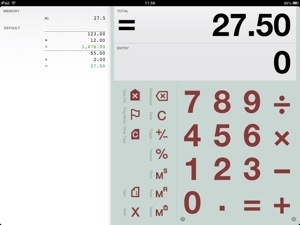
Digits is great for:
Adding up expenses, labeling and emailing them, doing a quick calculation and being able to double-check and correct entries with ease, entering a long series of calculations and then emailing it to yourself for import into Numbers or Excel, Quickly calculating a couple scenarios by editing any previous entry to automatically update the total, Easily creating a grand total from a number of previous calculations with flagging, Keeping a series of short calculations available for later reference,Sharing via email, printed output or by files.
FEATURES:
EASY: perfect for a quick calculation, powerful enough for pages of them.
MADE FOR iPad: uses the whole iPad display to leave cramped buttons behind.
MADE FOR iPhone: all of the iPad features on an interface designed just for iPhone.
TAPE: never lose track of what you’ve entered.
PRINT: print-quality output with AirPrint (where available).
SHARE: Use iTunes File Sharing to backup and share .digits tape files to other Digits Calculator users and your other iOS devices.
EMAIL: tap to email your tape.
COMMENTING: label any item in your tape and include comments in tape emails.
CORRECTIONS: make edits and inserts to previous calculations at any time!
SIMPLE TAPE STRUCTURE: one calculation on each tape line means quick one-touch access for edits.
AUTOSAVE: holds your calculations and tape in place for the next time you return.
RUNNING TOTAL: always displays the total above so you can focus on what you’re entering.
CUSTOMIZABLE: a wide arrange of settings, including currency mode, sound and background color!
Features:
Supports Retina display on iPhone, iPad and iPod Touch.
Support for iPhone 5 display.
Tape browser for multi-tape management.
Tape files are now sharable through iTunes File Sharing.
Tape files may be shared between iOS devices using File Sharing.
Supports AirPrint in iOS 4.2 and later.
Bluetooth/hardware keyboard support.
x/÷ priority option.
Fixed autodecimal for faster entry in currency mode.
Better handling of localized number formats.
“Use” function added back to the Tape/Memory Menu.
Expanded, detailed Guide.
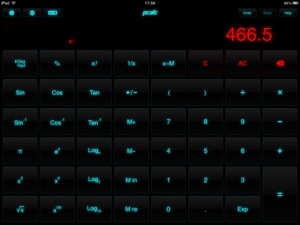
PCalc is ideal for scientists, engineers, students, programmers, or indeed anybody looking for a feature-rich calculator for the iPad, iPhone, or iPod touch.
It includes an extensive set of unit conversions, a paper tape, an RPN mode, engineering and scientific notation, as well as support for hexadecimal, octal and binary calculations.
Based on the popular calculator for the Macintosh, PCalc has been redesigned from the ground up to give the best handheld experience.
Features include:
Switchable button layouts – choose from many different horizontal and vertical layouts to suit your needs.
Calculator themes – pick your look, all the way from minimalist to striking.
An RPN mode with one button access to the stack and optional two, three, or four-line display.
Hexadecimal, octal and binary modes, complete with a variety of bitwise operators.
All the extensive unit conversions, functions, and constants from the desktop PCalc.
Editable user constants which are synced automatically across multiple devices with iCloud.
A simulated paper tape to keep track of your calculations with a “ticker tape” mode.
Multiple undo and redo. Just flick the LCD to the right and left to reveal the past and future.
Stylish, consistent user interface.
Supports copy and paste.
Universal build supports both iPad and iPhone/iPod touch in one.
Support for iOS 6 and Retina display on all devices including the new iPad.
Support for the iPhone 5 and new iPod touch.
 Gavin's Gadgets & Photography