Recently I received a Bluetooth iPad Mini Keyboard which also acts as a cover/case for the iPad Mini.
I was very curious as to how good it would be both as a keyboard and as a case. The first thing I did was unbox the keyboard. Inside there is a very clear and well written English instruction leaflet and a micro usb cable. The keyboard features bluetooth v3, designed to allow the Mini to rest upright and then close up as a case/cover, a home button, sleep mode, 60 day standby time, 55 hours uninterrupted working time and dust and waterproof resistant.
Pairing with the iPad Mini was a breeze. Turn on the bluetooth in the iPad Mini’s settings. Turn on the keyboard and hit connect. On the iPad select the keyboard and then type the pairing number on the keyboard that appears on the iPad screen, followed by enter. And that is it.
The keyboard has a home button, long pressing activates Siri. A quick double tap of the home button brings up the multitasking. The on screen keyboard automatically disappears, but you can bring this back up by pressing the dedicated keyboard button. Typing at first feels a bit cramped and I kept missing the shift key on the right hand side of the keyboard. Auto correction and capitalisation doesn’t happen automatically. However, with more usage my speed increased. In terms of design it is great for holding the Mini in an upright position, and I like how it then doubles up as a case. Photos as below. To protect the back of the Mini being scratched, I have a vinyl carbon cover attached.
Overall an average solution, but the keyboard keys are too squashed together for quick typing. It is not as quick as the on screen keyboard either, nor is it quick as a full size keyboard. Otherwise it works as described.
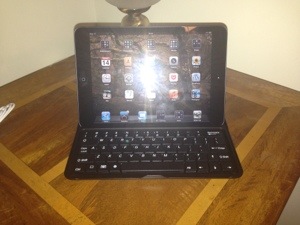

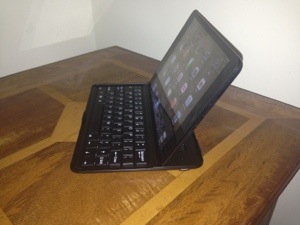
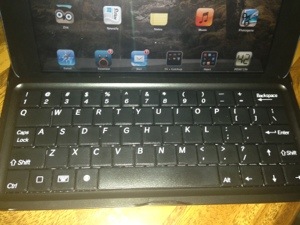
 Gavin's Gadgets & Photography
Typing on small keyboards like these is always a problem. Your description of typing on this keyboard is exactly the same as how I would describe typing on my keyboard for my Nexus 7. Just too small for comfortable typing for any stretch although I can use it for short spurts.
For me, the greater value in my keyboard cover is in using it as a case and it’s superb for that and it seems this one may be for you as well.
LikeLike